These are just a few highlights from the 25+ improvements in this release. Read on to check out all of the great updates below.
To the wider GitLab community, thank you for the 530+ contributions you provided to GitLab 18.9!
At GitLab, everyone can contribute and we couldn't have done it without you!
To preview what's coming in next month’s release, check out our What's new page.
Pooja has made significant contributions to ongoing efforts at GitLab to migrate legacy dropdown components to our modern dropdown architecture. These migrations require careful attention to detail and an understanding of both the old and new component systems. Pooja has consistently delivered high-quality work across multiple migrations, including updates to the diff file header, code block bubble menu, oncall schedules rotation assignee component, and the new resource dropdown.
Peter Hegman, Staff Frontend Engineer on Tenant Scale::Organizations at GitLab, nominated Pooja for this recognition, noting: “These migrations can be pretty tricky and she has completed a number of them. Thanks for your contributions!”
Beyond these migration efforts, Pooja has also contributed to feature development, including adding statuses to milestones and iterations, a feature she put significant effort into getting merged. Marc Saleiko, Staff Fullstack Engineer on Plan:Project Management at GitLab, recognised her work: “This is a valuable contribution and you did a great job delivering this functionality!” Reflecting on her experience, Pooja shared: “I’m proud of how it turned out and it was a great learning experience for me.”
She has also contributed numerous bug fixes and maintenance improvements across the GitLab codebase. Pooja’s work directly improves the maintainability and consistency of the GitLab user interface, making it easier for both contributors and team members to build and maintain features, and helping move the GitLab frontend architecture forward.
Thank you, Pooja, for your continued contributions to improving the GitLab codebase and for being such a reliable member of our contributor community!
Want to learn more about Pooja’s contributions? Check out her GitLab profile.
GitLab Duo Agent Platform is now generally available for GitLab Self-Managed customers with a cloud license. Billing for this feature is usage-based.
Administrators can configure compatible models for use with GitLab Duo Agent Platform. Administrators using AWS Bedrock or Azure OpenAI can also configure Anthropic Claude or OpenAI GPT models.
Triaging and remediating SAST vulnerabilities is one of the most time-consuming tasks in application security. After identifying a real vulnerability, developers need to understand the finding, locate the affected code, and write an appropriate fix. All of which take time and specialized knowledge.
In GitLab 18.9, we’re introducing Agentic SAST Vulnerability Resolution. When you trigger resolution for a SAST vulnerability, GitLab Duo autonomously analyzes the finding, reasons through the surrounding code context, generates a context-aware fix, and creates a merge request without any manual intervention.
Key capabilities include:
Agentic multi-step resolution: Rather than producing a single code suggestion, the GitLab Duo Agent Platform reasons through the vulnerability, evaluates the codebase, and produces a well-informed fix.
Automatic merge request creation: Generates a ready-to-review merge request with the proposed code fix for critical and high severity SAST vulnerabilities.
Quality scoring: Each generated fix includes a quality assessment so reviewers can quickly gauge confidence in the proposed remediation.
SAST vulnerability resolution is available from the vulnerability report and the individual vulnerability details pages. You can trigger a resolution directly from the individual vulnerability details page.
This feature is available as a free beta for Ultimate customers. We welcome your feedback in issue 585626.
You can now browse repository files with a collapsible file tree. The tree provides
a comprehensive view of your project structure, so you can expand and collapse directories
inline, jump between files in different parts of your repository, and maintain context
while you work.
The file tree appears as a resizable sidebar when you view repository files or directories.
You can toggle visibility with keyboard shortcuts, filter files by name or extension,
and navigate through complex project hierarchies. The tree synchronizes with your current
location, so when you select a file in the main content area, the tree updates to show
that file.
Your existing repository structure and file organization remain unchanged. With fewer page
loads required to move between files, this feature scales from small projects to large
codebases with thousands of files.
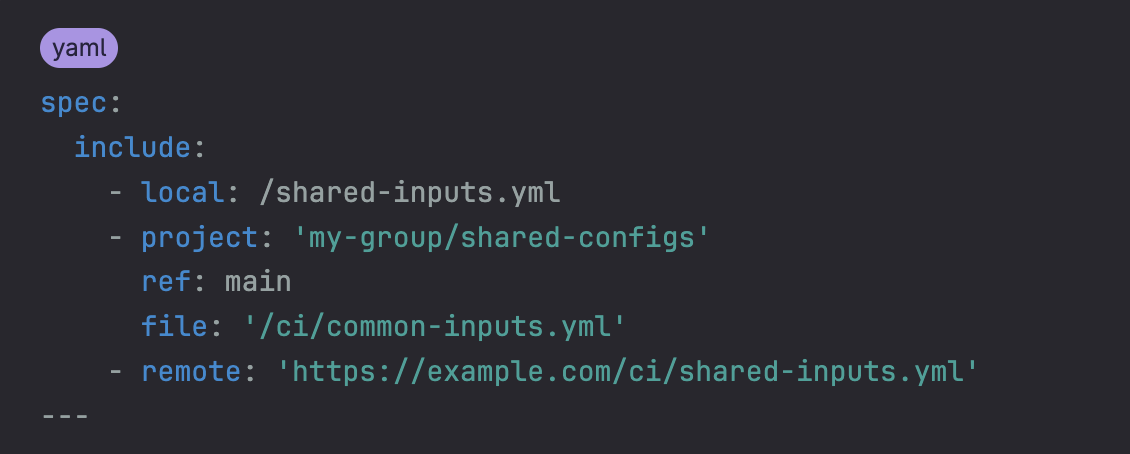
Previously, pipeline inputs could only be defined directly within a pipeline’s spec section. This limitation made it challenging to reuse input configuration across multiple projects.
In this release you can now include input definitions from external files using the familiar include keyword. Being able to maintain a list of inputs in a separate place helps you have a manageable solution across many projects or pipelines. You can maintain centralized input configurations and even dynamically manage input values from external sources.
Ensuring commits are cryptographically signed is essential for code integrity and meeting
compliance requirements. Previously, web-based commit signing was only available for GitLab Self-Managed.
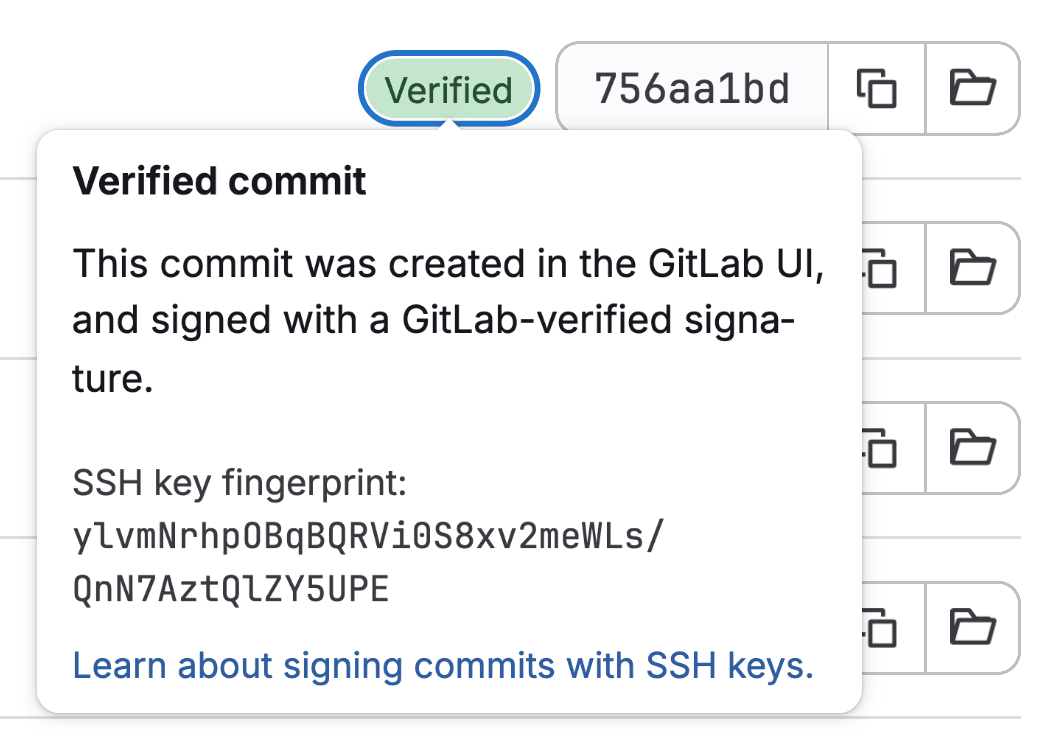
GitLab.com now supports web-based commit signing. When enabled for a group or project, commits
created through the GitLab web interface are automatically signed with the GitLab signing key and are
displayed with a Verified badge, providing cryptographic proof of authenticity for your repositories.
Key details:
Enable in group or project settings based on your requirements.
All web-based commits (Web IDE edits, merges, API operations) are automatically signed when enabled.
This brings the GitLab.com security capabilities in line with GitLab Self-Managed and provides
the foundation for comprehensive commit signing policies across your organization.
Modern container-based development requires accessing images from multiple registries including Docker Hub, Harbor, Quay, and private registries. Without a container virtual registry, platform engineers must configure each project and CI/CD pipeline to authenticate with and pull from multiple registries individually. This creates configuration complexity, slows pulls with sequential registry queries, and makes it difficult to implement consistent security policies across container sources.
The container virtual registry addresses these challenges by aggregating multiple upstream container registries behind a single endpoint. Platform engineers can configure Docker Hub, Harbor, Quay, and other registries with long-lived token authentication through one URL. Intelligent caching improves pull performance while integrating with the GitLab authentication systems for centralized access control and audit logging.
The container virtual registry API is currently available in beta for GitLab Premium and Ultimate customers. Beta participants can use the GitLab API to create container virtual registries, configure multiple upstream sources with shareable configurations, and pull container images through the virtual registry. Please note the beta does not support registries that require IAM authentication. Support for cloud provider registries requiring IAM authentication is tracked in this epic.
On GitLab.com, this feature is behind a feature flag. To request access or share feedback, please comment in the feedback issue.
Reviewing commits with many changed files or substantial modifications can be slow.
Rapid Diffs technology now powers the commits page (/-/commits/<SHA>), delivering faster
loading times, smoother scrolling, and more responsive interactions.
With Rapid Diffs, you’ll notice:
A pagination-free experience.
Faster initial load, so you can start working with code sooner.
A refreshed interface with a new file browser for quicker navigation between files.
Responsive interactions, even with large numbers of changed files.
All existing functionality is preserved. As Rapid Diffs expands to other areas of GitLab, the same performance benefits will follow.
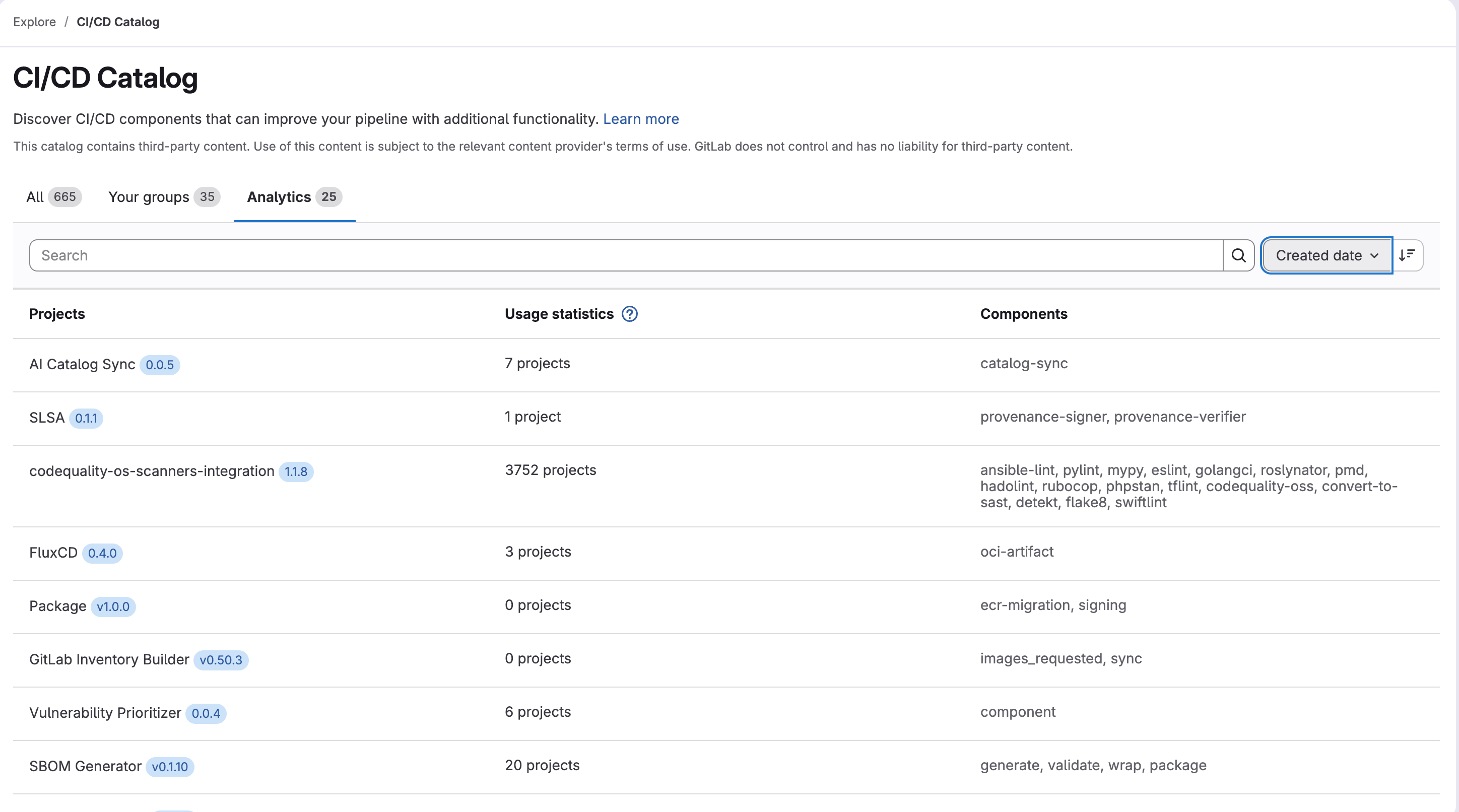
Previously, teams lacked visibility into how CI/CD Catalog component projects were being used across their organization. Now you can view usage counts and adoption patterns at a high level, helping you understand which component projects are most valuable and optimize your catalog investments.
You can now view security and compliance reports from child pipelines directly in merge request widgets. Previously, you had to manually navigate through multiple pipelines to identify security issues, creating inefficient workflows especially with monorepos and complex testing setups.
With this enhancement, the merge request widget displays reports from child pipelines directly alongside parent pipeline results, with each child pipeline’s reports presented individually and artifacts available for download. This provides a unified view of all security checks, significantly reducing time spent investigating failures and enables faster merge request reviews when using parent-child pipelines.
GitLab dependency scanning by using SBOM now supports scanning Python requirements.txt manifest files.
Previously, dependency scanning for Python projects required a lock file to be present.
Now, when a lock file is not available, the analyzer automatically falls back to scanning requirements.txt files, extracting and reporting only direct dependencies for vulnerability analysis.
This improvement makes it easier for Python projects to enable dependency scanning without requiring a lock file.
To enable manifest fallback, set the DS_ENABLE_MANIFEST_FALLBACK CI/CD variable to "true".
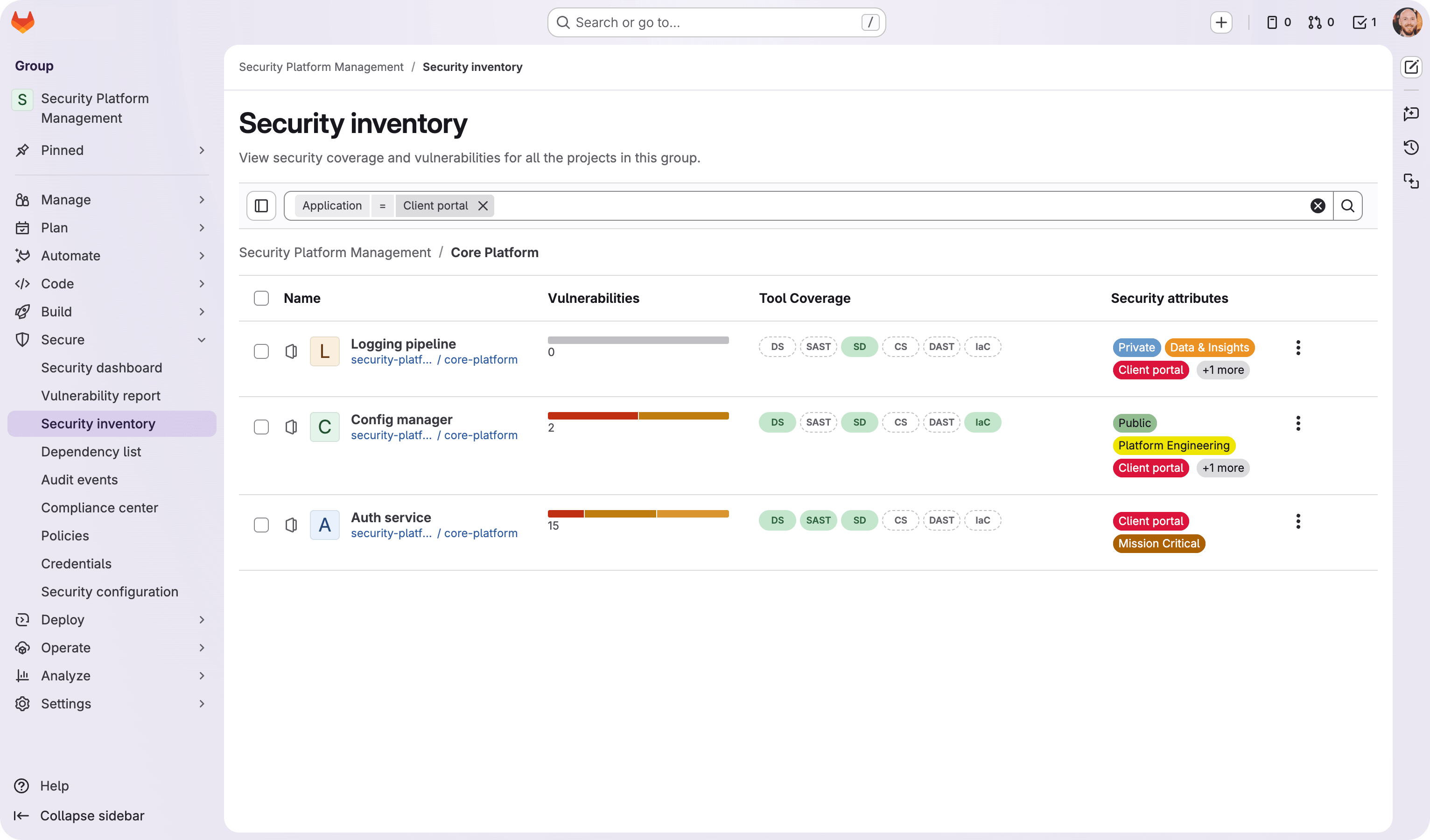
Security attributes allow security teams to apply business context to their projects, including business impact, application, business unit, internet exposure, and location. You can also create custom attribute categories to match your organization’s taxonomy. By applying these attributes, you can filter and prioritize the items in your security inventory based on risk posture and organizational context.
Teams evaluating GitLab can now test agentic AI capabilities that automate complex development workflows and reduce manual tasks. Sign up for a GitLab Ultimate trial and get access to Duo Agent Platform with 24 evaluation credits per user, enabling hands-on experience with autonomous task execution and multi-step workflow orchestration during a 30-day evaluation. Evaluation credits are available for 30 days from the provision date, so consider your team’s readiness before starting.
Managing completed initiatives and abandoned projects is now easier.
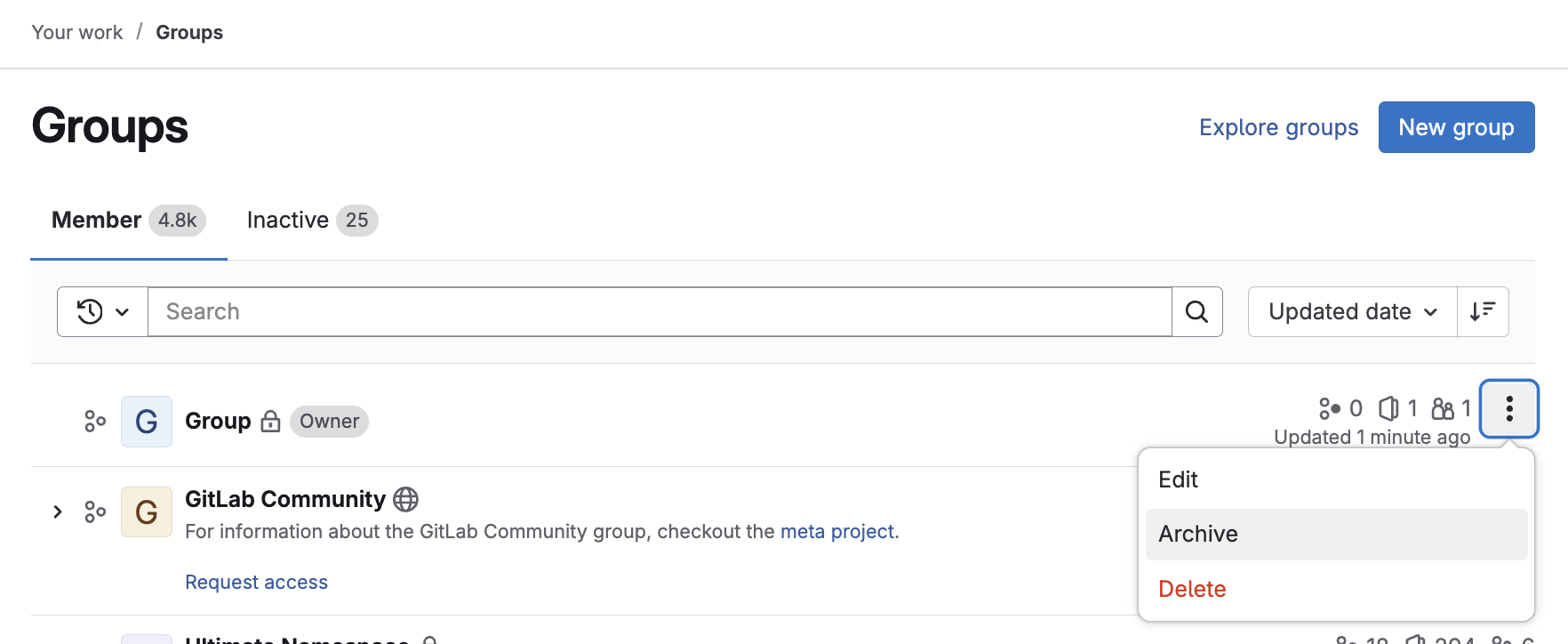
You can now archive entire groups, including all subgroups and projects, in one action, eliminating the need to manually archive each project individually.
When you archive a group:
All nested subgroups and projects are automatically archived.
Archived content moves to the Inactive tab with clear status badges.
Group data remains fully accessible in read-only mode for reference or restoration.
Write permissions are disabled across the archived group and its content.
Beyond the Settings page, you can archive groups and projects directly from the actions menu in list views. No more navigating through multiple screens for simple administrative tasks.
This highly requested feature dramatically reduces administrative overhead while keeping your workspace organized with clear separation between active and inactive work.
Share your feedback in epic 18616.
The GitLab Duo plugin for JetBrains IDEs now supports OAuth authentication for GitLab Self-Managed and GitLab Dedicated. This means all JetBrains users can now enjoy a faster, more secure sign-in experience. No personal access token required.
Zero Downtime Upgrades are now officially supported for GitLab Helm chart deployments.
Enterprise customers require their DevSecOps platform to be available at all times, making upgrade-related downtime a significant operational concern.
Until now, Zero Downtime Upgrades were only supported for Linux package-based high availability deployments, which drove many customers toward VM-based architectures even when cloud-native Kubernetes deployments would have better suited their infrastructure strategy.
We’ve been upgrading our own Cloud Native Hybrid SaaS instances with zero downtime for years.
With this release, we’re bringing that same operational experience to self-managed customers running GitLab on Kubernetes.
The upgrade procedure has been comprehensively tested and is now fully documented, giving you the confidence to maintain availability during version upgrades.
Organizations using GitLab.com need to ensure that enterprise users don’t accidentally expose
sensitive code through personal snippets.
Previously, there was no way to prevent users from creating snippets in their personal namespace,
which can pose a security risk if snippets are inadvertently set to public.
Group Owners can now restrict personal snippet creation for enterprise users, helping maintain
tighter control over where code is shared.
When restricted, enterprise users cannot create snippets in their personal namespace.
You can now view timestamps on each CI job log line to identify performance bottlenecks and debug long-running jobs. Timestamps are displayed in UTC format. Use timestamps to troubleshoot performance issues, identify bottlenecks, and measure the duration of specific build steps. Requires GitLab Runner 18.7 or later for GitLab Self-Managed.
GitLab CI/CD analytics now combines CI/CD pipeline and CI/CD job performance trends, which enables developers to identify
inefficient or problematic CI/CD jobs quickly. These capabilities are included directly in the GitLab UI, so developers
have the tools they need in context to identify and fix CI/CD performance problems that can significantly impact
development teams’ velocity and overall productivity. For platform administrators, the CI/CD jobs data in this view also
reduces the need to rely on external or custom-built CI/CD observability solutions when you operate GitLab at an enterprise
scale.
GitLab dependency scanning by using SBOM now supports scanning Java pom.xml manifest files.
Previously, dependency scanning for Java projects using Maven required a graph file to be present.
Now, when a graph file is not available, the analyzer automatically falls back to scanning pom.xml files, extracting and reporting only direct dependencies for vulnerability analysis.
This improvement makes it easier for Java projects to enable dependency scanning without requiring a graph file.
To enable manifest fallback, set the DS_ENABLE_MANIFEST_FALLBACK CI/CD variable to "true".
Manage and visualize security scanner coverage across your organization. This release introduces security configuration profiles, starting with the secret detection profile.
Security teams now have a more powerful command center to secure your organization at scale.
Profile-based security configuration
Instead of manually editing YAML files for each project, you can now use preconfigured security configuration profiles that provide several advantages:
Standardized governance: Preconfigured profiles apply appropriate boundaries without interrupting productivity. You can apply standardized security best practices, without requiring custom role configurations.
Scalable management: Apply the same profile across hundreds or thousands of projects with a single action.
The secret detection profile is the first security configuration profile available. It provides the following advantages:
Actively identifies and blocks secrets from being committed to your repositories.
One profile manages secret detection across your entire development workflow. No need to manage separate configurations for different trigger types.
Enhanced security inventory
The security inventory has been upgraded to act as your primary dashboard to assess each group’s security posture:
Group and project hierarchies: Easily distinguish between subgroups and projects in the inventory with clear iconography.
Bulk actions: A new Bulk Action menu allows you to apply or disable security scanner profiles across all selected projects and subgroups simultaneously.
Visual coverage status: Quickly identify gaps with color-coded status bars (Enabled, Not Enabled, or Failed) with tooltips for details.
Profile status indicators: See which trigger types are available in the profile details.
The Vulnerabilities over time chart is updated to provide a more accurate view of your vulnerability inventory.
The chart previously included vulnerabilities that were no longer detected, leading to inflated numbers that did not accurately represent the state of active vulnerabilities.
We are aware of two additional issues that may slightly alter counts in some cases. Follow issue 590022 and issue 590018 for updates.
Previously, organizations that used identity providers to automate user provisioning on GitLab Self-Managed Premium might run into a potential problem. When identity provider syncs attempt to add users beyond the licensed seat limit, administrators must either purchase extra seats for users who don’t need active access, or manually intervene to prevent failures.
Now, users with the Minimal Access role on GitLab Self-Managed Premium subscriptions no longer count as billable seats, bringing them in line with how minimal access works on GitLab.com Premium, GitLab.com Ultimate, and GitLab Self-Managed Ultimate.
This change unlocks the restricted access feature, which automatically assigns the Minimal Access role to users who would otherwise exceed the seat limit during identity provider syncs. This change keeps syncs running smoothly without unexpected billing overages or manual intervention.
You can now troubleshoot and verify data integrity directly from the primary site, thanks to the new data management view that brings detailed verification status information to the primary Geo site. This enhancement eliminates the need to access secondary sites for basic verification and troubleshooting tasks.
Previously, this verification status was only accessible through the secondary site UI. Now, with the data management view on the primary site, you can:
View detailed verification status for all replicable data types on the primary site
Perform data sanitization and troubleshooting tasks directly from the primary UI
Set up and verify your Geo configuration on the primary site before adding secondary sites
This enhancement is the first step toward comprehensive self-serve troubleshooting with the UI, reducing the need to access multiple sites for routine maintenance and issue resolution.
Starting with GitLab 18.9, Valkey is bundled as an opt-in replacement for Redis in the Linux package.
Redis changed their license to AGPLv3, which is not suitable for open source customers. To guarantee security and maintainability for our
GitLab Self-Managed customers, we are transitioning from Redis to Valkey, a community-driven fork that maintains the permissive BSD license.
Transition timeline:
GitLab 18.9 (this release): Valkey is bundled as an opt-in replacement (beta). You can switch from Redis to Valkey at your convenience. Valkey Sentinel support
is included.
GitLab 19.0 (May 2026): Valkey becomes the default and Redis binaries are removed from the Linux package. Existing Redis configuration settings remain
functional and are honored for backwards compatibility.
This transition only affects the bundled Redis in Linux packages. Customers on scaled architectures using external Redis deployments can continue to use Redis.
We are monitoring the potential feature divergence between Redis and Valkey and will provide guidance as the ecosystem evolves.
Bug fixes, performance improvements, and UI improvements
At GitLab, we’re dedicated to providing the best possible experience for our users. With every release, we work tirelessly to fix bugs, improve performance, and enhance UI. Whether you’re one of the over 1 million users on GitLab.com or using our platform elsewhere, we’re committed to making sure your time with us is smooth and seamless.
Click the links below to see all the bug fixes, performance enhancements, and UI improvements we’ve delivered in 18.9.
GitLab has been upgraded to use Ruby 3.3. This upgrade introduces improvements to the Ruby garbage collector, such as a reduction in heap fragmentation and time spent in major garbage collection.
For self-compiled installations, when upgrading to GitLab 18.9 or later, administrators must have Ruby 3.3.x or later. This change is necessary because Ruby 3.2 reaches its end-of-life on March 31, 2026, and will no longer receive official updates or support.






We want to hear from you
Enjoyed reading this blog post or have questions or feedback? Share your thoughts by creating a new topic in the GitLab community forum.
Share your feedback