Published on: March 5, 2026
11 min read
A complete guide to GitLab Container Scanning
Explore GitLab's various container scanning methods and learn how to secure containers at every lifecycle stage.


Container vulnerabilities don't wait for your next deployment. They can emerge at any point, including when you build an image or while containers run in production. GitLab addresses this reality with multiple container scanning approaches, each designed for different stages of your container lifecycle.
In this guide, we'll explore the different types of container scanning GitLab offers, how to enable each one, and common configurations to get you started.
Why container scanning matters
Security vulnerabilities in container images create risk throughout your application lifecycle. Base images, OS packages, and application dependencies can all harbor vulnerabilities that attackers actively exploit. Container scanning detects these risks early, before they reach production, and provides remediation paths when available.
Container scanning is a critical component of Software Composition Analysis (SCA), helping you understand and secure the external dependencies your containerized applications rely on.
The five types of GitLab Container Scanning
GitLab offers five distinct container scanning approaches, each serving a specific purpose in your security strategy.
1. Pipeline-based Container Scanning
- What it does: Scans container images during your CI/CD pipeline execution, catching vulnerabilities before deployment
- Best for: Shift-left security, blocking vulnerable images from reaching production
- Tier availability: Free, Premium, and Ultimate (with enhanced features in Ultimate)
- Documentation
GitLab uses the Trivy security scanner to analyze container images for known vulnerabilities. When your pipeline runs, the scanner examines your images and generates a detailed report.
How to enable pipeline-based Container Scanning
Option A: Preconfigured merge request
- Navigate to Secure > Security configuration in your project.
- Find the "Container Scanning" row.
- Select Configure with a merge request.
- This automatically creates a merge request with the necessary configuration.
Option B: Manual configuration
- Add the following to your
.gitlab-ci.yml:
      include:
  - template: Jobs/Container-Scanning.gitlab-ci.yml
Common configurations
Scan a specific image:
To scan a specific image, overwrite the CS_IMAGE variable in the container_scanning job.
      include:
  - template: Jobs/Container-Scanning.gitlab-ci.yml

container_scanning:
  variables:
    CS_IMAGE: myregistry.com/myapp:latest
Filter by severity threshold:
To only find vulnerabilities with a certain severity criteria, overwrite the
CS_SEVERITY_THRESHOLD variable in the container_scanning job. In the example
below, only vulnerabilities with a severity of High or greater will be displayed.
      include:
  - template: Jobs/Container-Scanning.gitlab-ci.yml

container_scanning:
  variables:
    CS_SEVERITY_THRESHOLD: "HIGH"
Viewing vulnerabilities in a merge request
Viewing Container Scanning vulnerabilities directly within merge requests makes security reviews seamless and efficient. Once Container Scanning is configured in your CI/CD pipeline, GitLab automatically display detected vulnerabilities in the merge request's Security widget.
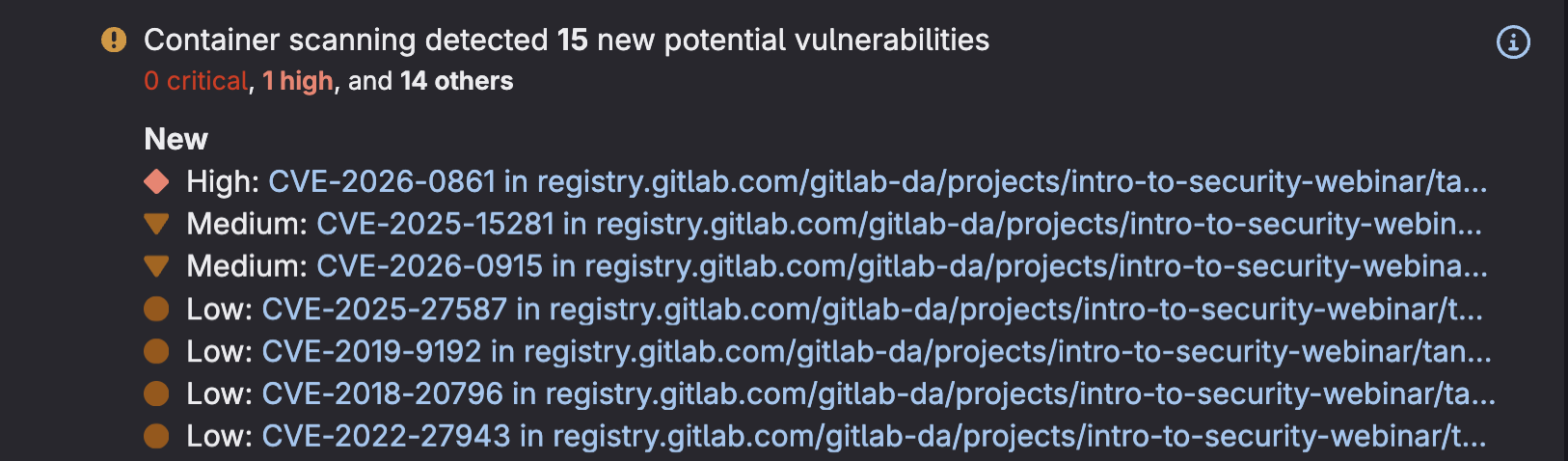 Container Scanning vulnerabilities displayed in MR
- Navigate to any merge request and scroll to the "Security Scanning" section to see a summary of newly introduced and existing vulnerabilities found in your container images.
- Click on a Vulnerability to access detailed information about the finding, including severity level, affected packages, and available remediation guidance.
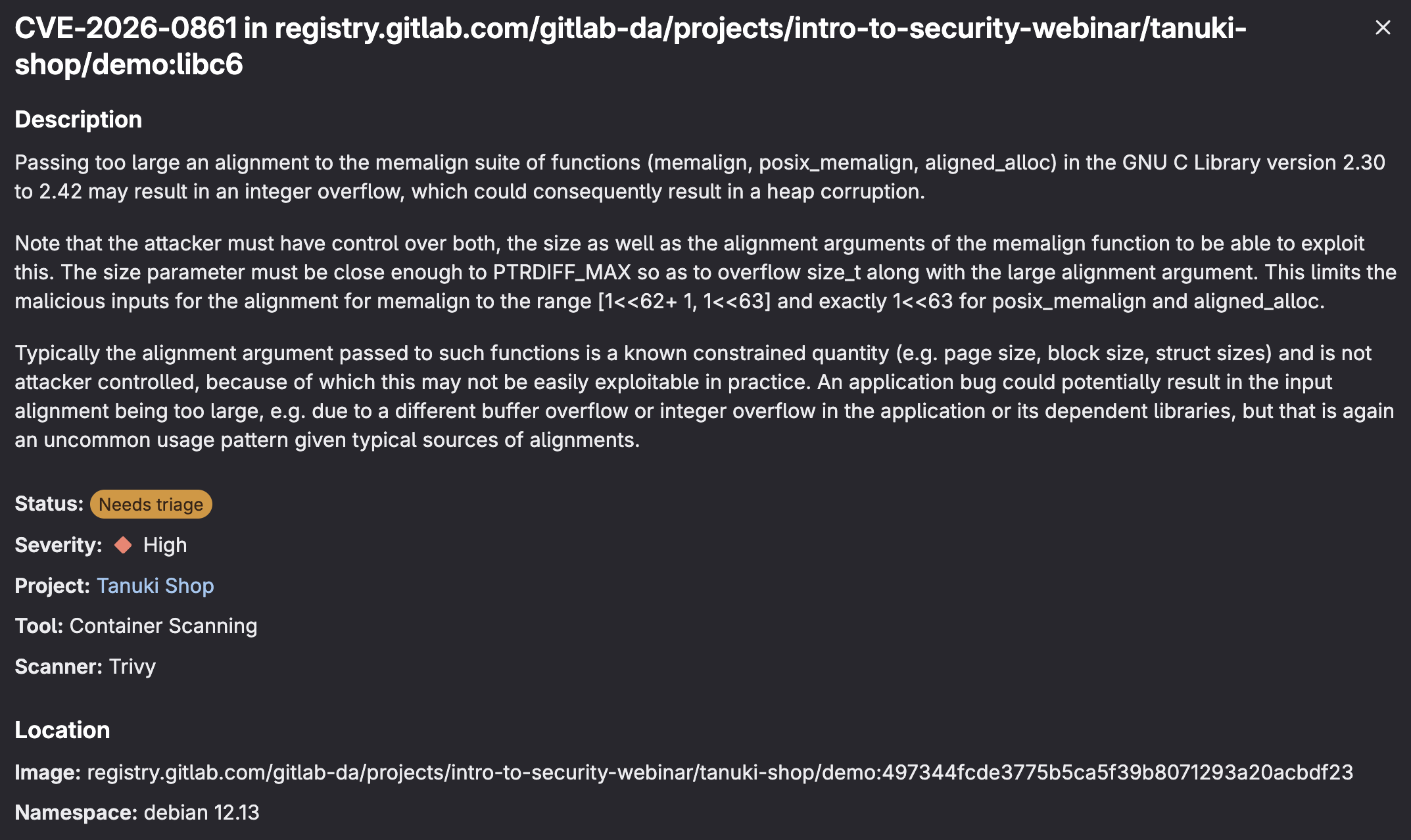
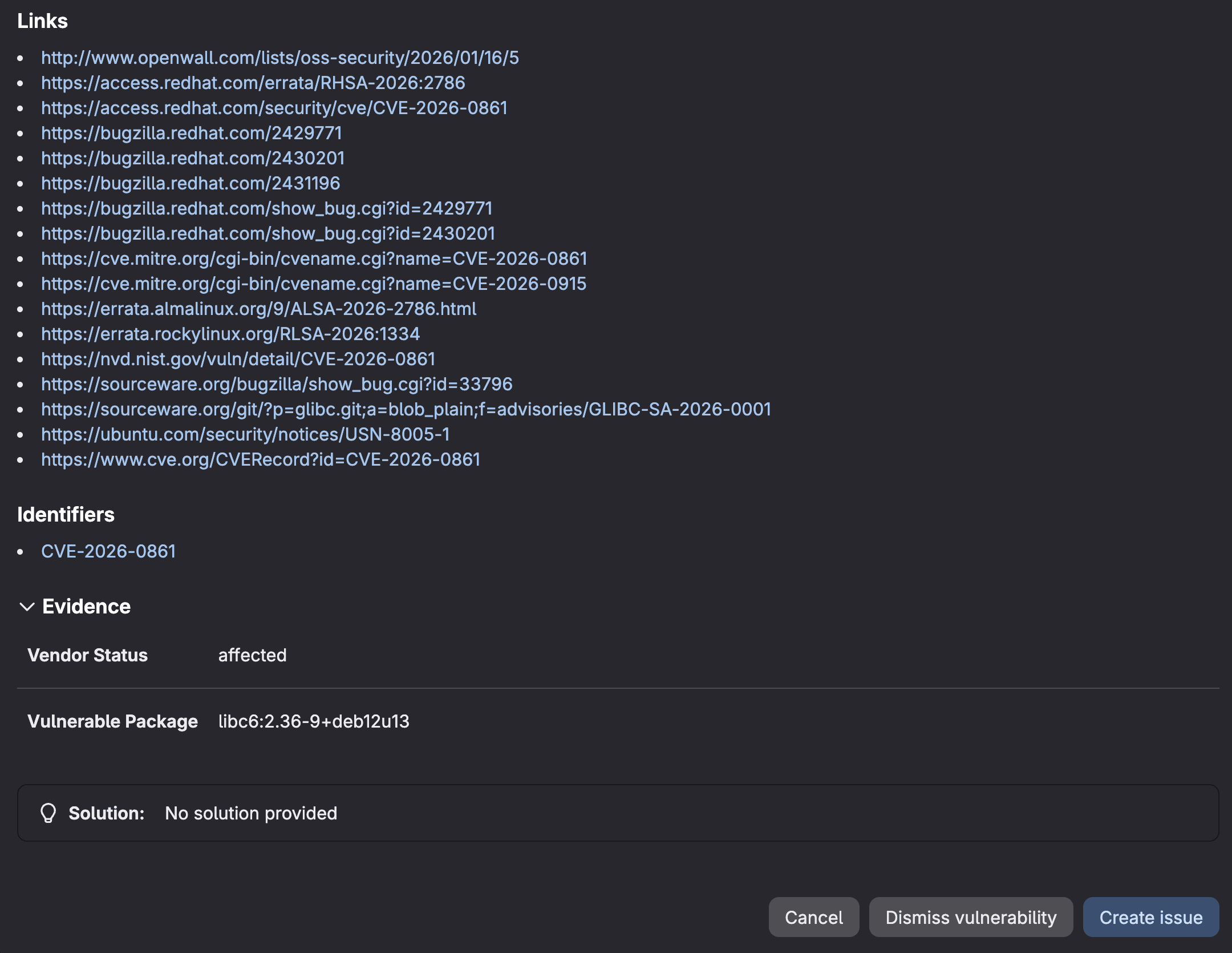 Container Scanning vulnerability details in MR
This visibility enables developers and security teams to catch and address container vulnerabilities before they reach production, making security an integral part of your code review process rather than a separate gate.
Viewing vulnerabilities in Vulnerability Report
Beyond merge request reviews, GitLab provides a centralized Vulnerability Report that gives security teams comprehensive visibility across all Container Scanning findings in your project.
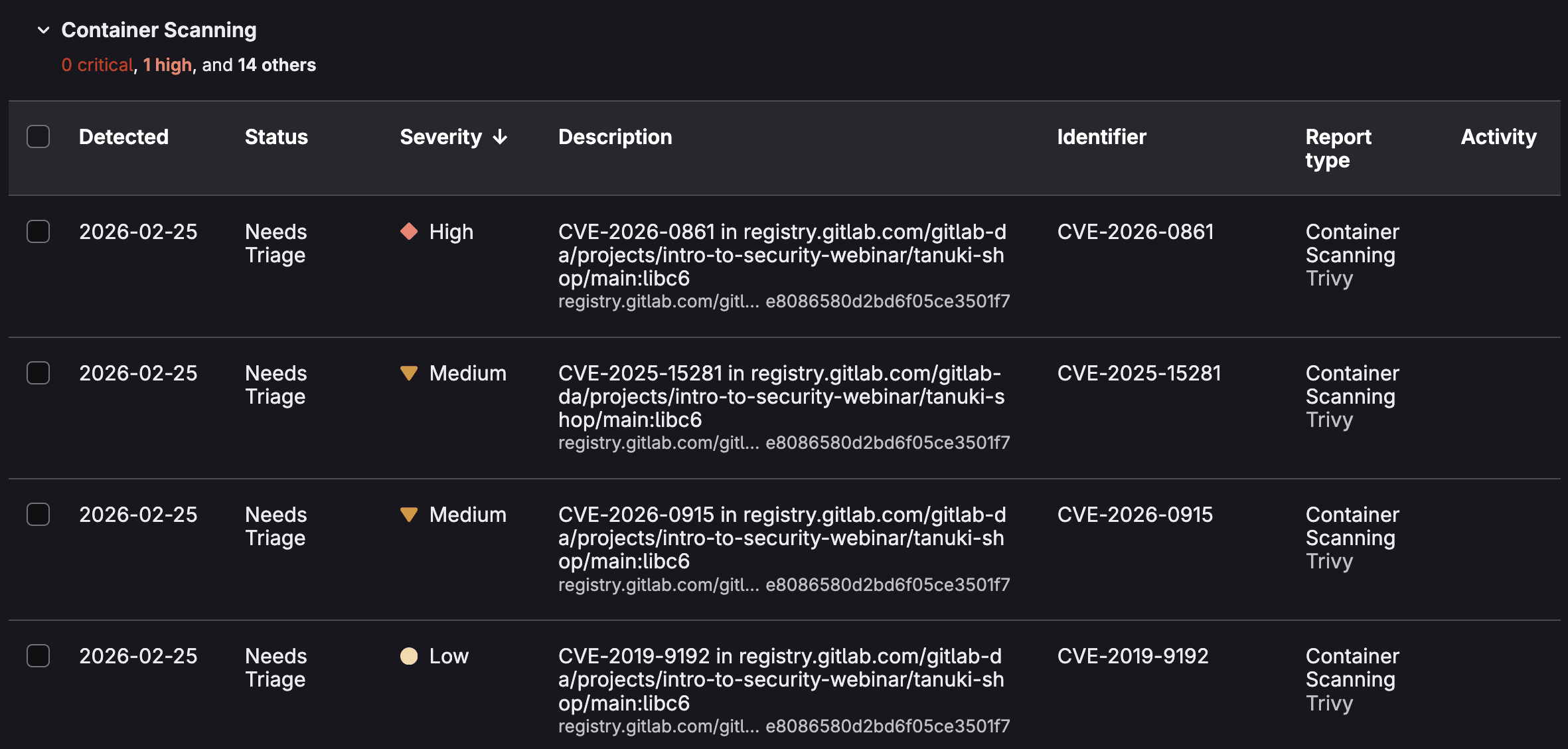 Vulnerability Report sorted by Container Scanning
- Access this report by navigating to Security & Compliance > Vulnerability Report in your project sidebar.
- Here you'll find an aggregated view of all container vulnerabilities detected across your branches, with powerful filtering options to sort by severity, status, scanner type, or specific container images.
- You can click on a vulnerabilty to access its Vulnerablity page.
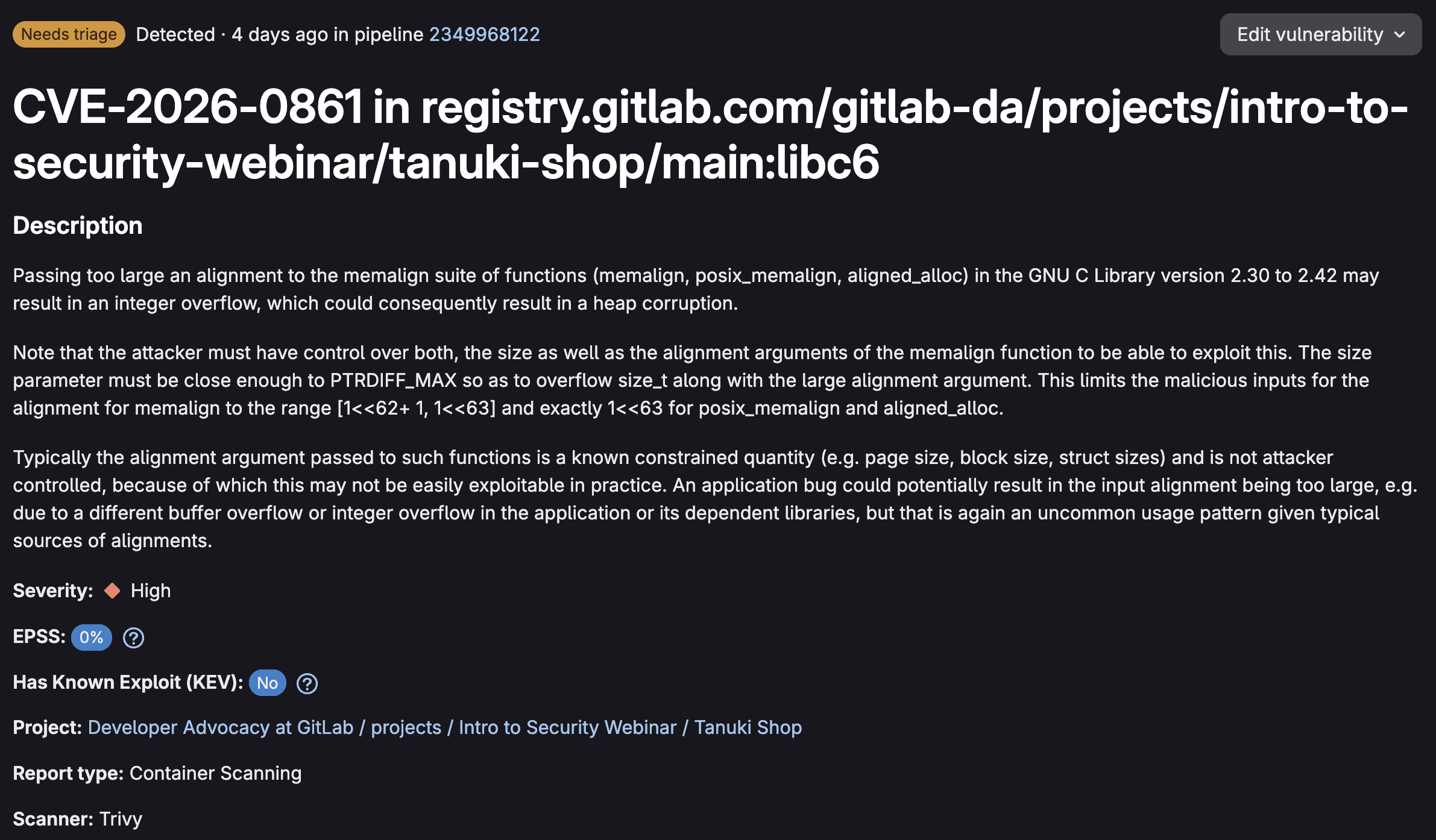
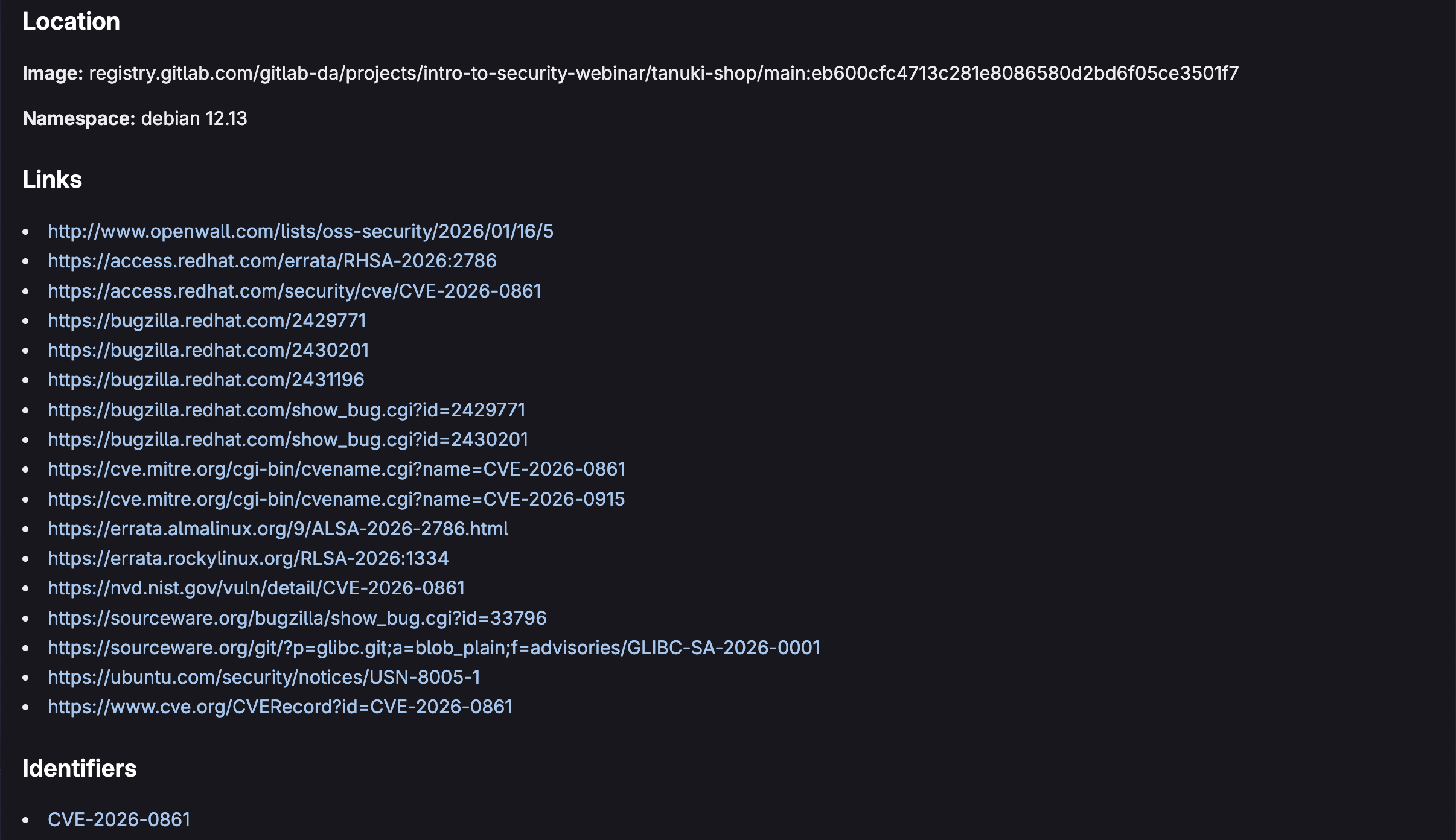
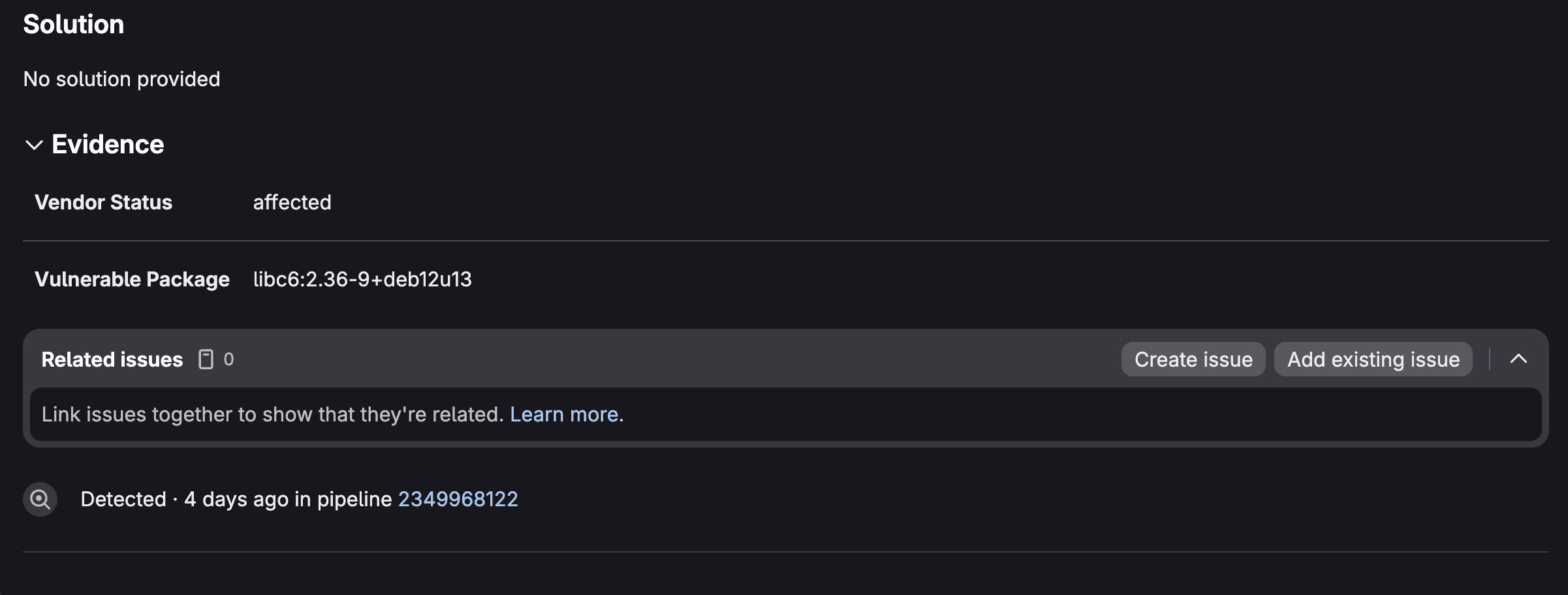 Vunerability Details for a Container Scanning vulnerability
Vulnerability Details shows exactly which container images and layers are impacted, making it easier to trace the vulnerability back to its source. You can assign vulnerabilities to team members, change their status (detected, confirmed, resolved, dismissed), add comments for collaboration, and link related issues for tracking remediation work.
This workflow transforms vulnerability management from a spreadsheet exercise into an integrated part of your development process, ensuring that container security findings are tracked, prioritized, and resolved systematically.
View the Dependency List
GitLab's Dependency List provides a comprehensive software bill of materials (SBOM) that catalogs every component within your container images, giving you complete transparency into your software supply chain.
- Navigate to Security & Compliance > Dependency List to access an inventory of all packages, libraries, and dependencies detected by Container Scanning across your project.
- This view is invaluable for understanding what's actually running inside your containers, from base OS packages to application-level dependencies.
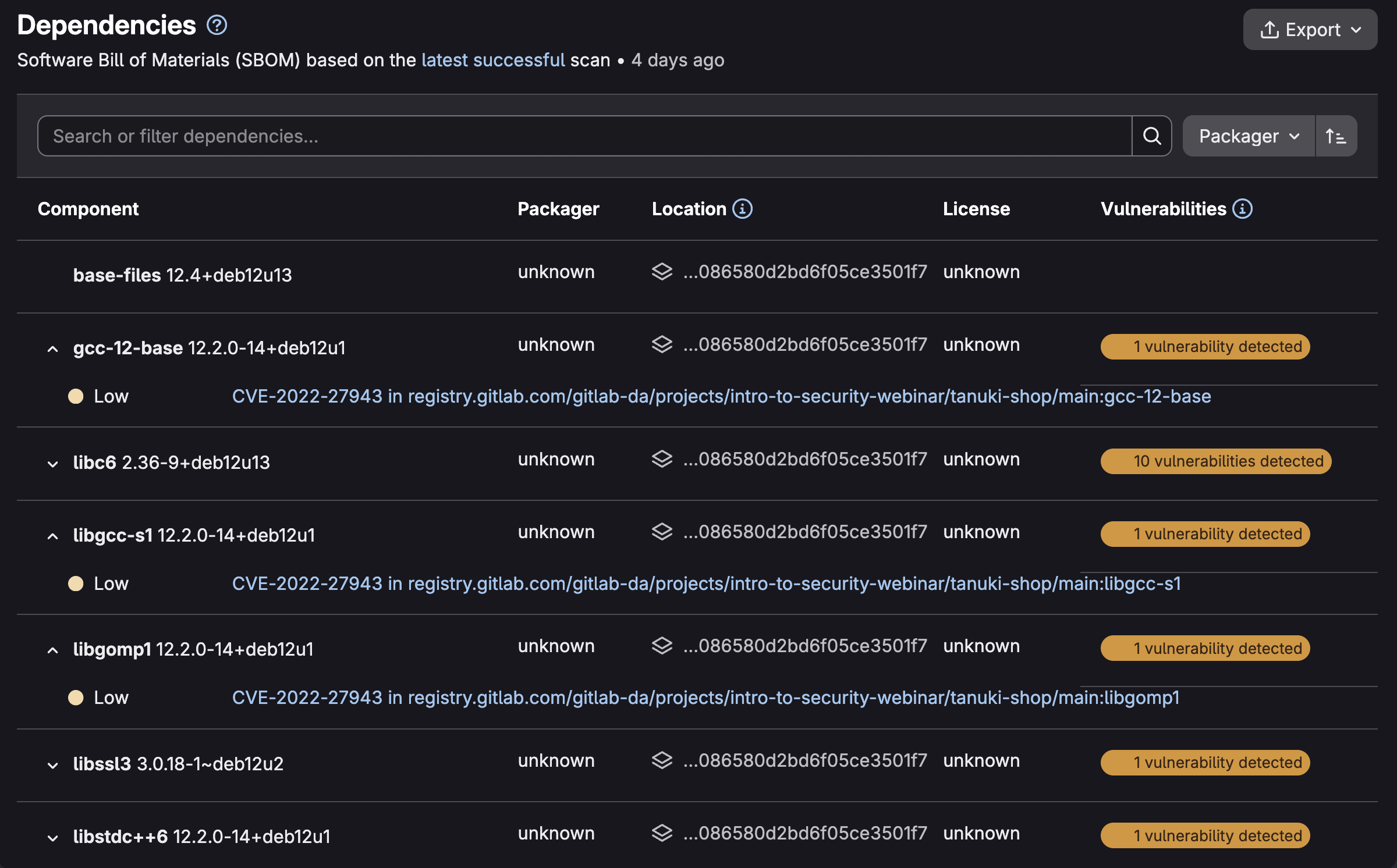 GitLab Dependency List (SBOM)
You can filter the list by package manager, license type, or vulnerability status to quickly identify which components pose security risks or compliance concerns. Each dependency entry shows associated vulnerabilities, allowing you to understand security issues in the context of your actual software components rather than as isolated findings.
2. Container Scanning for Registry
- What it does: Automatically scans images pushed to your GitLab Container Registry
with the
latesttag - Best for: Continuous monitoring of registry images without manual pipeline triggers
- Tier availability: Ultimate only
- Documentation
When you push a container image tagged latest, GitLab's security policy bot
automatically triggers a scan against the default branch. Unlike pipeline-based
scanning, this approach works with Continuous Vulnerability Scanning to monitor
for newly published advisories.
How to enable Container Scanning for Registry
- Navigate to Secure > Security configuration.
- Scroll to the Container Scanning For Registry section.
- Toggle the feature on.
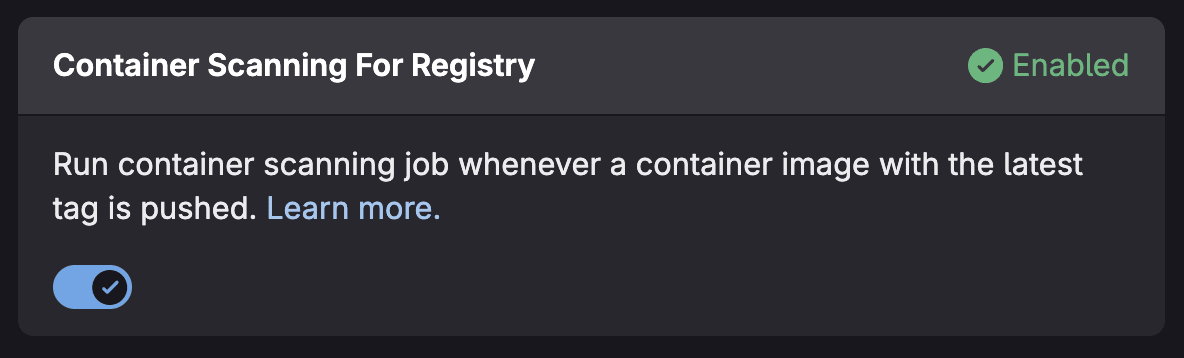 Toggle for Container Scanning for Registry
Prerequisites
- Maintainer role or higher in the project
- Project must not be empty (requires at least one commit on the default branch)
- Container Registry notifications must be configured
- Package Metadata Database must be configured (enabled by default on GitLab.com)
Vulnerabilities appear under the Container Registry vulnerabilities tab in your Vulnerability Report.
3. Multi-Container Scanning
- What it does: Scans multiple container images in parallel within a single pipeline
- Best for: Microservices architectures and projects with multiple container images
- Tier availability: Free, Premium, and Ultimate (currently in Beta)
- Documentation
Multi-Container Scanning uses dynamic child pipelines to run scans concurrently, significantly reducing overall pipeline execution time when you need to scan multiple images.
How to enable Multi-Container scanning
- Create a
.gitlab-multi-image.ymlfile in your repository root:
      scanTargets:
  - name: alpine
    tag: "3.19"
  - name: python
    tag: "3.9-slim"
  - name: nginx
    tag: "1.25"
- Include the template in your
.gitlab-ci.yml:
      include:
  - template: Jobs/Multi-Container-Scanning.latest.gitlab-ci.yml
Advanced configuration
Scan images from private registries:
      auths:
  registry.gitlab.com:
    username: ${CI_REGISTRY_USER}
    password: ${CI_REGISTRY_PASSWORD}

scanTargets:
  - name: registry.gitlab.com/private/image
    tag: latest
Include license information:
      includeLicenses: true

scanTargets:
  - name: postgres
    tag: "15-alpine"
4. Continuous Vulnerability Scanning
- What it does: Automatically creates vulnerabilities when new security advisories are published, no pipeline required
- Best for: Proactive security monitoring between deployments
- Tier availability: Ultimate only
- Documentation
Traditional scanning only catches vulnerabilities at scan time. But what happens when a new CVE is published tomorrow for a package you scanned yesterday? Continuous Vulnerability Scanning solves this by monitoring the GitLab Advisory Database and automatically creating vulnerability records when new advisories affect your components.
How it works
- Your Container Scanning or Dependency Scanning job generates a CycloneDX SBOM.
- GitLab registers your project's components from this SBOM.
- When new advisories are published, GitLab checks if your components are affected.
- Vulnerabilities are automatically created in your vulnerability report.
Key considerations
- Scans run via background jobs (Sidekiq), not CI pipelines.
- Only advisories published within the last 14 days are considered for new component detection.
- Vulnerabilities use "GitLab SBoM Vulnerability Scanner" as the scanner name.
- To mark vulnerabilities as resolved, you still need to run a pipeline-based scan.
5. Operational Container Scanning
- What it does: Scans running containers in your Kubernetes cluster on a scheduled cadence
- Best for: Post-deployment security monitoring and runtime vulnerability detection
- Tier availability: Ultimate only
- Documentation
Operational Container Scanning bridges the gap between build-time security and runtime security. Using the GitLab Agent for Kubernetes, it scans containers actually running in your clusters—catching vulnerabilities that emerge after deployment.
How to enable Operational Container Scanning
If you are using the GitLab Kubernetes Agent, you can add the following to your agent configuration file:
      container_scanning:
  cadence: '0 0 * * *'  # Daily at midnight
  vulnerability_report:
    namespaces:
      include:
        - production
        - staging
You can also create a scan execution policy that enforces scanning on a schedule by the GitLab Kubernetes Agent.
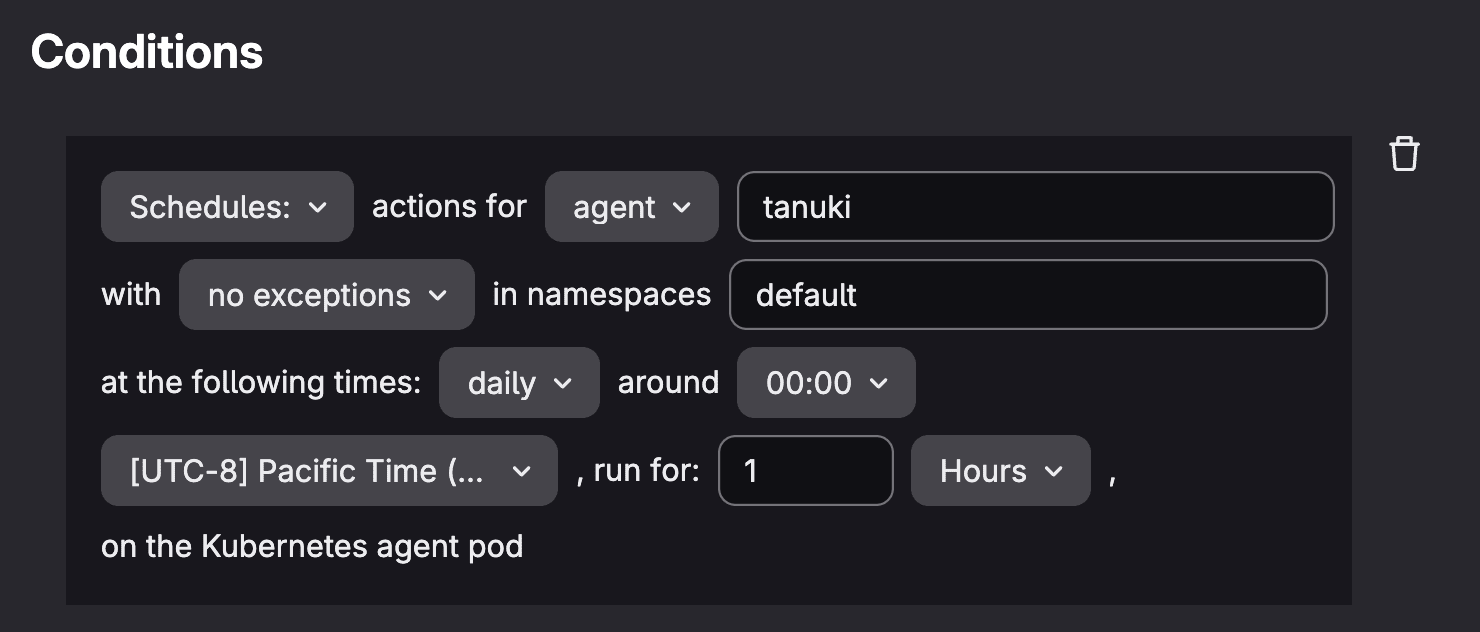 Scan execution policy conditions for Operational Container Scanning
Viewing results
- Navigate to Operate > Kubernetes clusters.
- Select the Agent tab, and choose your agent.
- Then select the Security tab to view cluster vulnerabilities.
- Results also appear under the Operational Vulnerabilities tab in the Vulnerability Report.
Enhancing posture with GitLab Security Policies
GitLab Security Policies enable you to enforce consistent security standards across your container workflows through automated, policy-driven controls. These policies shift security left by embedding requirements directly into your development pipeline, ensuring vulnerabilities are caught and addressed before code reaches production.
Scan execution and pipeline policies
Scan execution policies automate when and how Container Scanning runs across your projects. Define policies that trigger container scans on every merge request, schedule recurring scans of your main branch, and more. These policies ensure comprehensive coverage without relying on developers to manually configure scanning in each project's CI/CD pipeline.
You can specify which scanner versions to use and configure scanning parameters centrally, maintaining consistency across your organization while adapting to new container security threats.
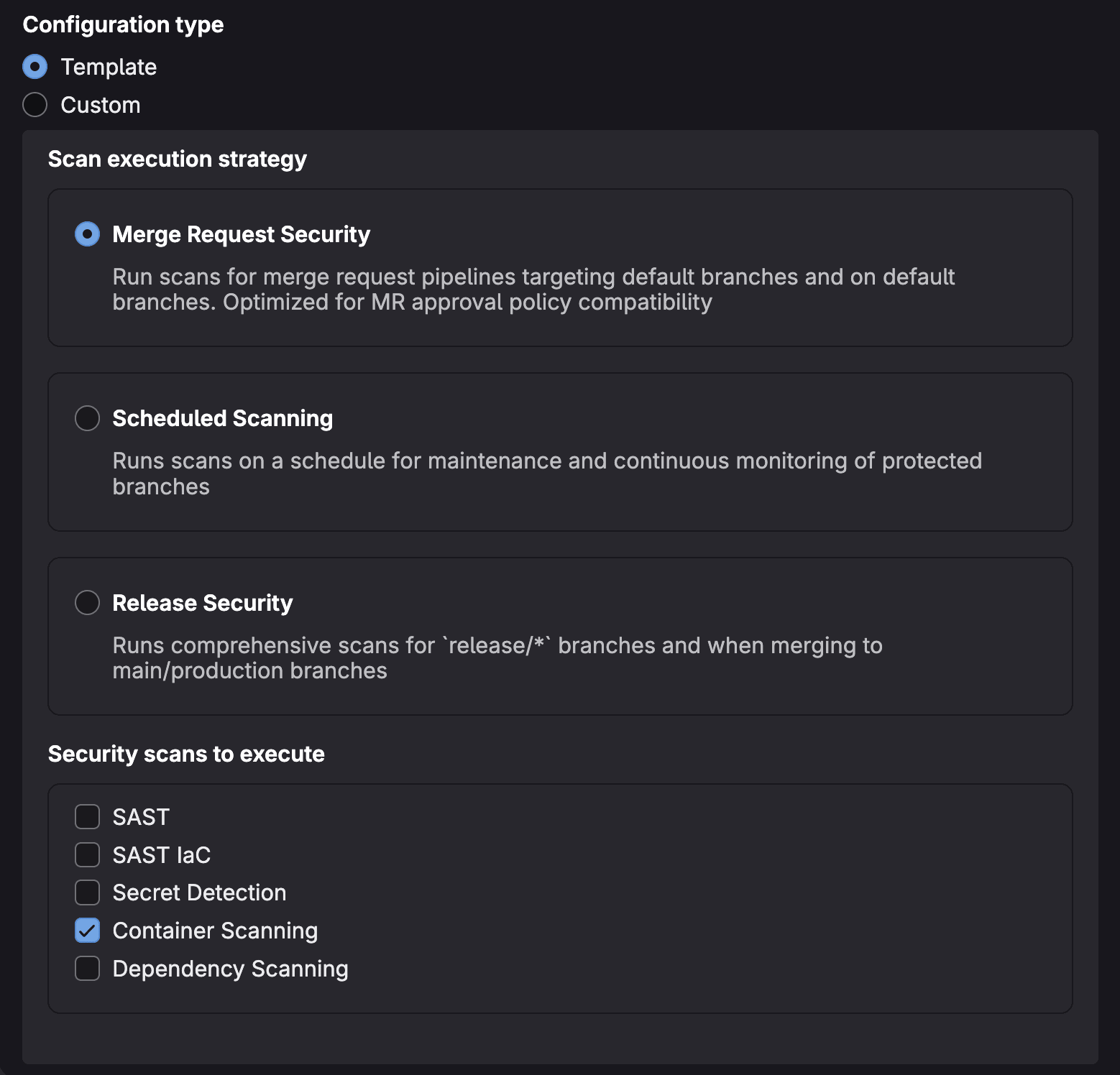 Scan execution policy configuration
Pipeline execution policies provide flexible controls for injecting (or overriding) custom jobs into a pipeline based on your compliance needs.
Use these policies to automatically inject Container Scanning jobs into your pipeline, fail builds when container vulnerabilities exceed your risk tolerance, trigger additional security checks for specific branches or tags, or enforce compliance requirements for container images destined for production environments. Pipeline execution policies act as automated guardrails, ensuring your security standards are consistently applied across all container deployments without manual intervention.
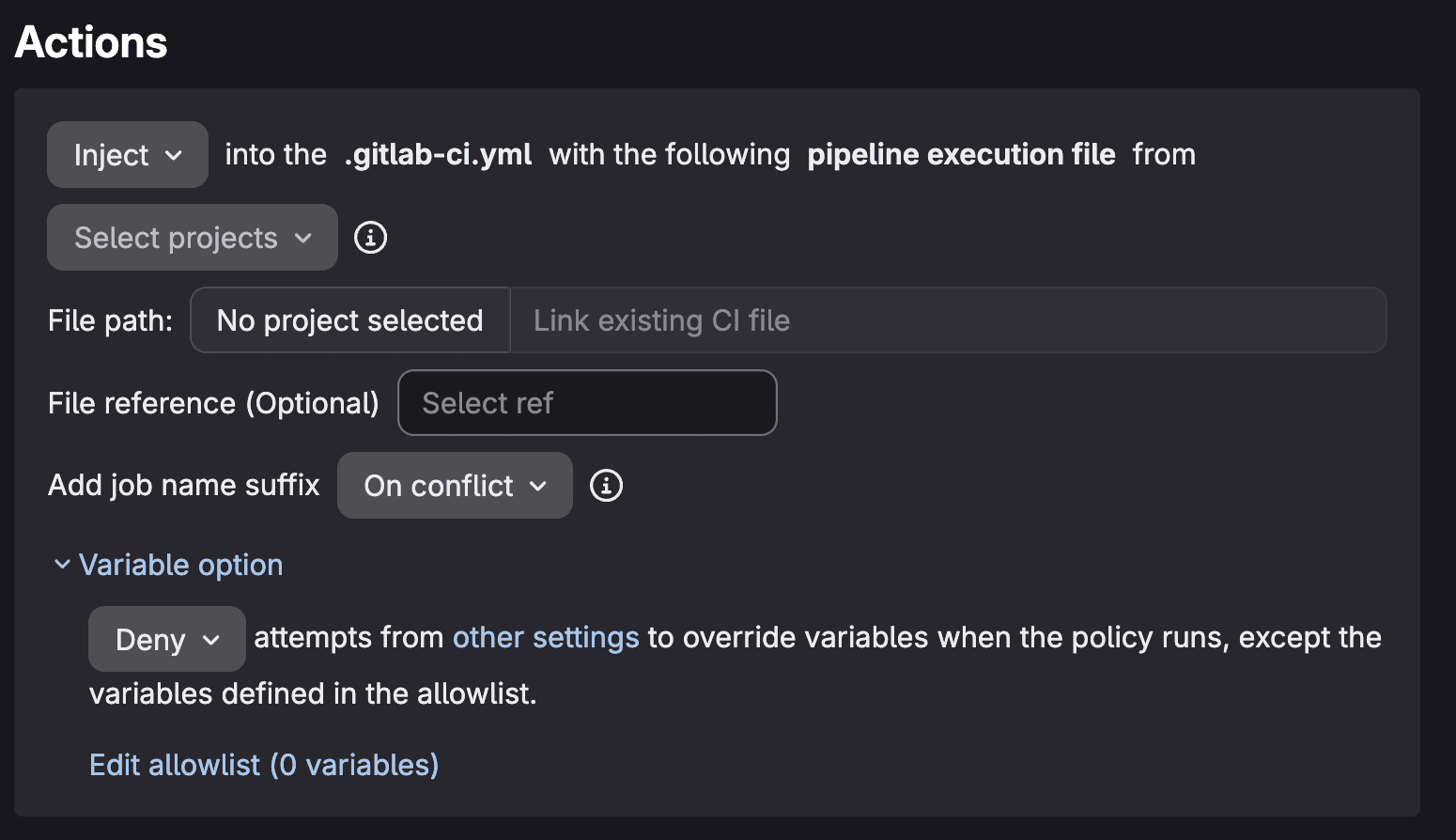 Pipeline execution policy actions
Merge request approval policies
Merge request approval policies enforce security gates by requiring designated approvers to review and sign off on merge requests containing container vulnerabilities.
Configure policies that block merge when critical or high-severity vulnerabilities are detected, or require security team approval for any merge request introducing new container findings. These policies prevent vulnerable container images from advancing through your pipeline while maintaining development velocity for low-risk changes.
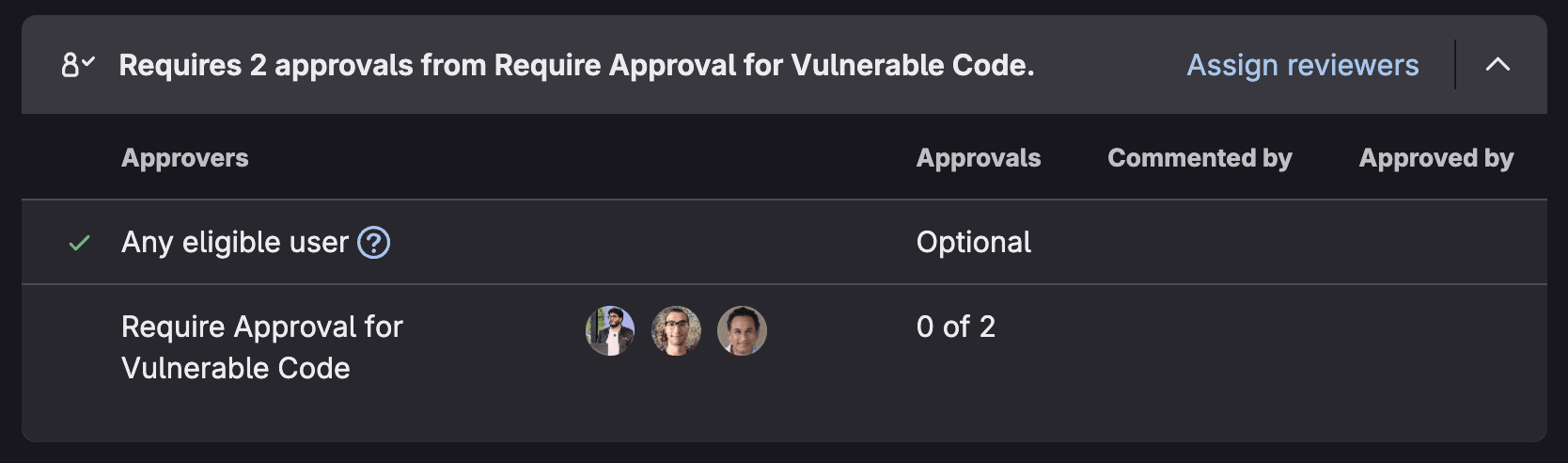 Merge request approval policy performing block in MR
Choosing the right approach
| Scanning Type | When to Use | Key Benefit |
|---|---|---|
| Pipeline-based | Every build | Shift-left security, blocks vulnerable builds |
| Registry scanning | Continuous monitoring | Catches new CVEs in stored images |
| Multi-container | Microservices | Parallel scanning, faster pipelines |
| Continuous vulnerability | Between deployments | Proactive advisory monitoring |
| Operational | Production monitoring | Runtime vulnerability detection |
For comprehensive security, consider combining multiple approaches. Use pipeline-based scanning to catch issues during development, container scanning for registry for continuous monitoring, and operational scanning for production visibility.
Get started today
The fastest path to container security is enabling pipeline-based scanning:
- Navigate to your project's Secure > Security configuration.
- Click Configure with a merge request for Container Scanning.
- Merge the resulting merge request.
- Your next pipeline will include vulnerability scanning.
From there, layer in additional scanning types based on your security requirements and GitLab tier.
Container security isn't a one-time activity, it's an ongoing process. With GitLab's comprehensive container scanning capabilities, you can detect vulnerabilities at every stage of your container lifecycle, from build to runtime.
For more information on how GitLab can help enhance your security posture, visit the GitLab Security and Governance Solutions Page.

We want to hear from you
Enjoyed reading this blog post or have questions or feedback? Share your thoughts by creating a new topic in the GitLab community forum.
Share your feedback