Published on: May 18, 2026
15 min read
Codex and GitLab: From code fix to production
Learn how to use Codex in the terminal, GitLab MCP for issue-aware development, and external AI agents in GitLab Duo Agent Platform to move from bug report to reviewed change.


Codex, a coding agent, is a lot of fun when you are deep in the terminal. Point it at a repository, give it a focused task, and it gets to work fast. It reads the code, proposes a fix, runs commands, and helps you move from idea to code without leaving the flow. That developer experience is a big part of the appeal of agentic coding tools, and it is also what made our recent Claude Code tutorial work so well.
But writing the code is only the first step. You still need the issue, the merge request, the CI/CD pipeline, the review, and the final human decision to ship the change. Writing code and shipping software are not the same thing, and that gap becomes more obvious as coding agents get faster.
That is where GitLab comes in. In this tutorial, we will walk through the following three use cases with Codex and GitLab Duo Agent Platform:
- Fix a Rust WebSocket bug locally to get started with Codex
- Enrich the context with GitLab MCP to fix the Rust bug aligned to issue requirements
- Use Codex within GitLab Duo Agent Platform as an external agent to help address review feedback in the merge request
We are using the Tanuki IoT Platform project for all three use cases. The Rust metrics backend provides two practical bugs to work with: a WebSocket metric filter bug and a REST API validation bug. Let’s get started!
Prerequisites
- Codex in the terminal, configured and running.
- A GitLab project with bug reports and feature proposal issues, for example, the Tanuki Iot Platform project
- For specific use cases: GitLab MCP server and GitLab Duo Agent Platform with external agents.
- For building code: Cargo and Rust compiler, for example, rustup.
Prepare the GitLab project
If you want to repeat the workflow in your own environment, start by importing and cloning the project and opening Codex in the repository root:
- Import the Tanuki Iot Platform project into your GitLab environment, including all open issues.
- Clone the project into your local environment, and navigate into it.
- Open a terminal and run Codex with
codex.
      git clone https://gitlab.example.com/examplegroup/tanuki-iot-platform.git
cd tanuki-iot-platform

codex
Ask in the prompt to learn more about the project’s purpose.
What is this project about?
The part we care about in this tutorial is the Rust metrics store in the backend/ directory. Sensors send readings through a REST API, and dashboards consume live data over WebSocket streams. That makes both the problem and the fix easy to see.
Get started with Codex and GitLab and fix a Rust backend bug
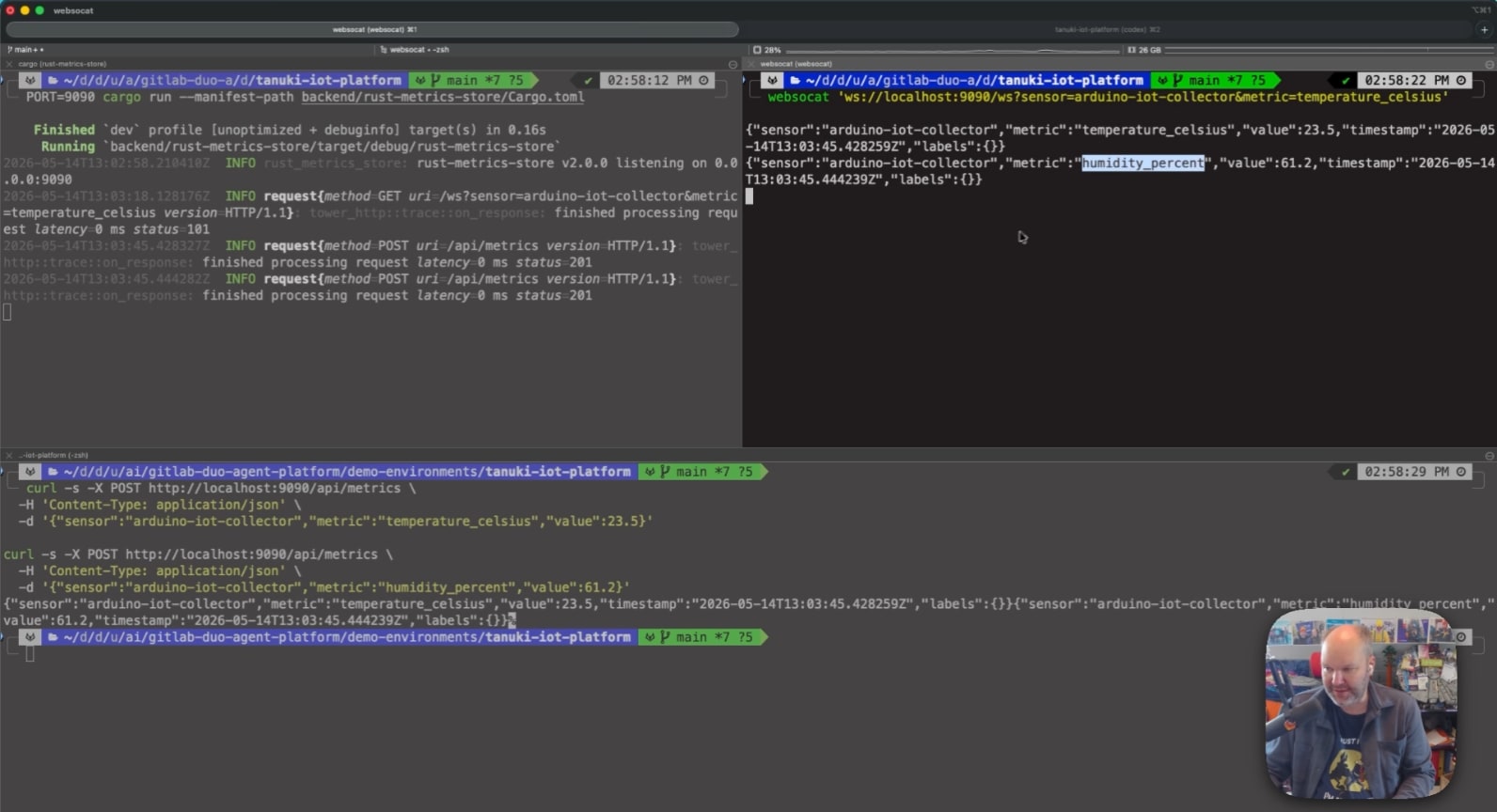
In this scenario, a bug sits in the live WebSocket stream. The backend already supports metric filtering on the REST API side, but the WebSocket stream does not seem to correctly filter by metric. As a test, if we subscribe to one sensor and one metric, we still get other metrics back. Here is a quick test in the terminal to confirm the problem.
Start the backend in one terminal, listening on port 9090:
PORT=9090 cargo run --manifest-path backend/rust-metrics-store/Cargo.toml
Open a WebSocket client in a second terminal. On macOS, websocat is available in Homebrew: brew install websocat.
websocat 'ws://localhost:9090/ws?sensor=arduino-iot-collector&metric=temperature_celsius'
Now send two different metrics for the arduino-iot-collector sensor.
      curl -s -X POST http://localhost:9090/api/metrics \
  -H 'Content-Type: application/json' \
  -d '{"sensor":"arduino-iot-collector","metric":"temperature_celsius","value":23.5}'

curl -s -X POST http://localhost:9090/api/metrics \
  -H 'Content-Type: application/json' \
  -d '{"sensor":"arduino-iot-collector","metric":"humidity_percent","value":61.2}'
You expect to see only temperature_celsius, but the stream also shows humidity_percent, which confirms the bug.
 Terminal with three sessions: Running the metrics backend, using `websocat` to read the WebSocket stream, and sending test metrics with curl.
That is the point where we hand the problem to Codex in a new prompt:
I need help with a backend change to add metric filtering to /ws so live streams can be narrowed to one metric.
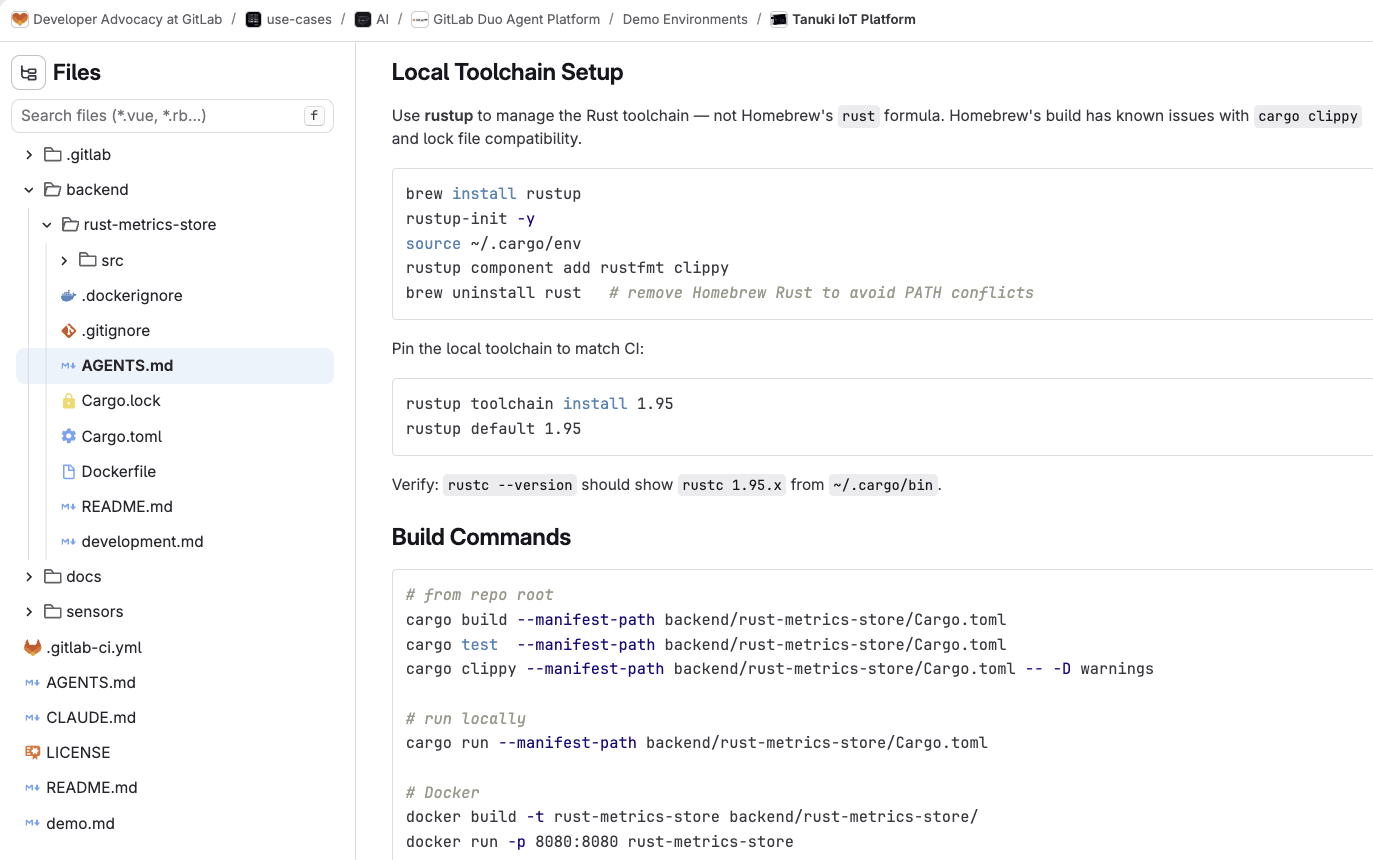
Thanks to our AGENTS.md file within our GitLab project, Codex knows how the Rust backend is structured, which commands to run, and what the code quality expectations look like.
 `AGENTS.md` with Rust toolchain setup and build commands for agents.
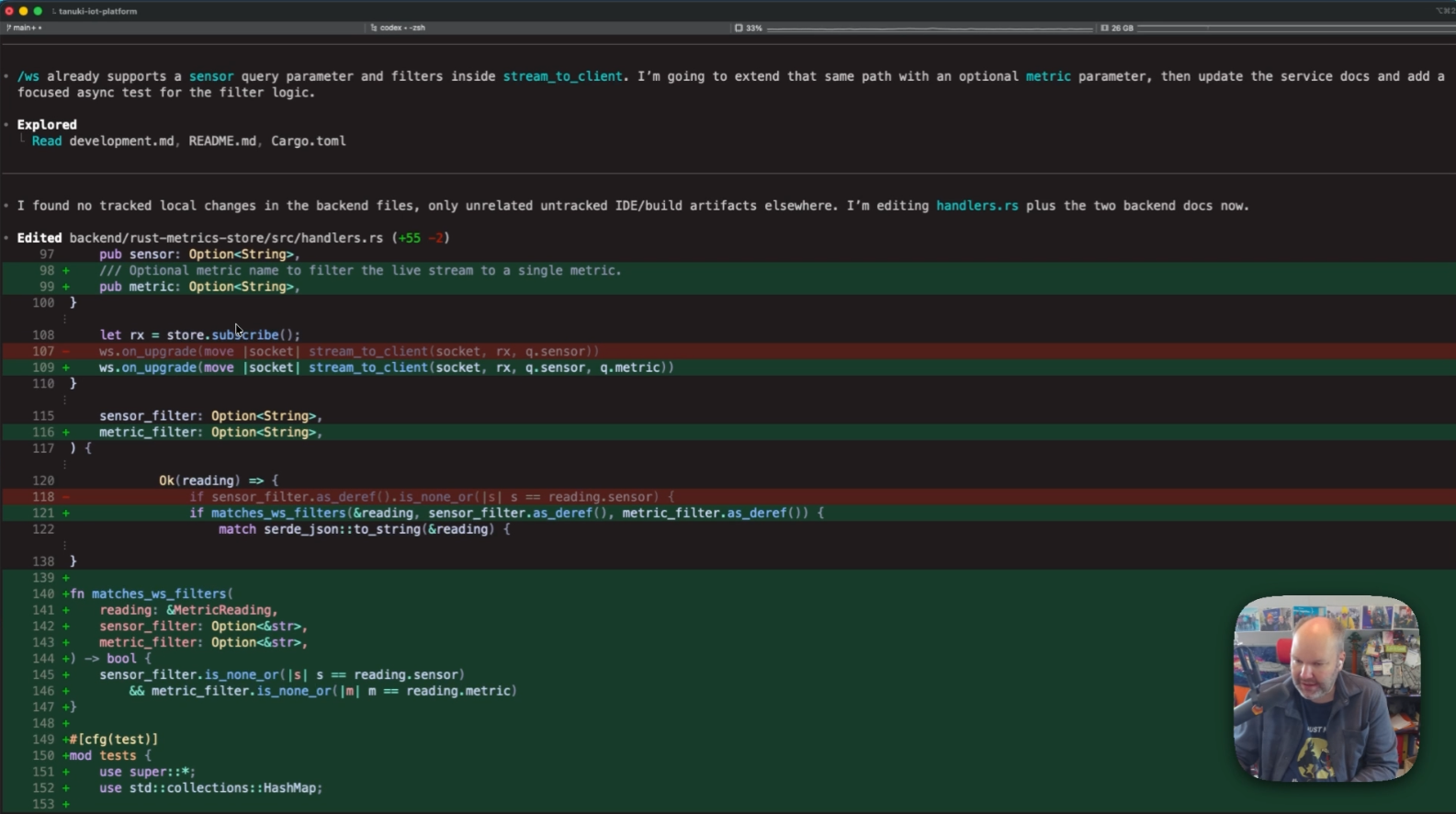
Codex inspects the Rust source and figures out the missing piece. The /ws endpoint already understands a sensor query parameter, but it needs an optional metric parameter, too. Codex helps update the handler logic, adds tests, and keeps the documentation in sync with the code change.
After the code changes, Codex runs formatting, tests, and the build. Codex then performs a final check before touching Git. From there, we can ask it to create a branch, commit, and push the change.
 Codex fixing the bug, showing the diff edit.
Once the merge request exists, GitLab takes over the next stages of the software lifecycle. CI/CD pipelines start, security scanning runs and GitLab Duo Code Review verifies the changes against Rust code style requirements.
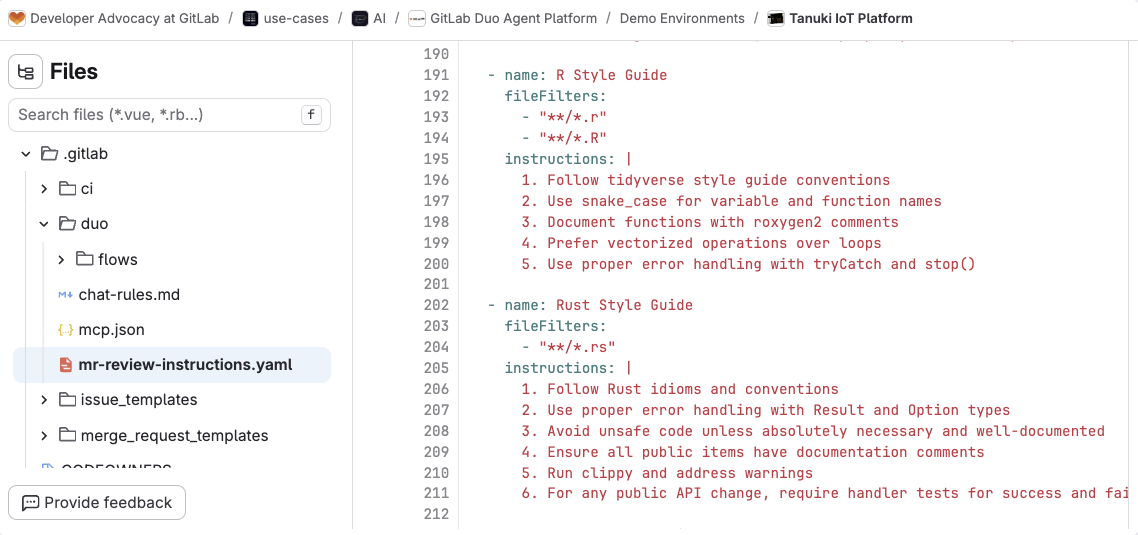
 GitLab Duo Code Review instructions for Rust.
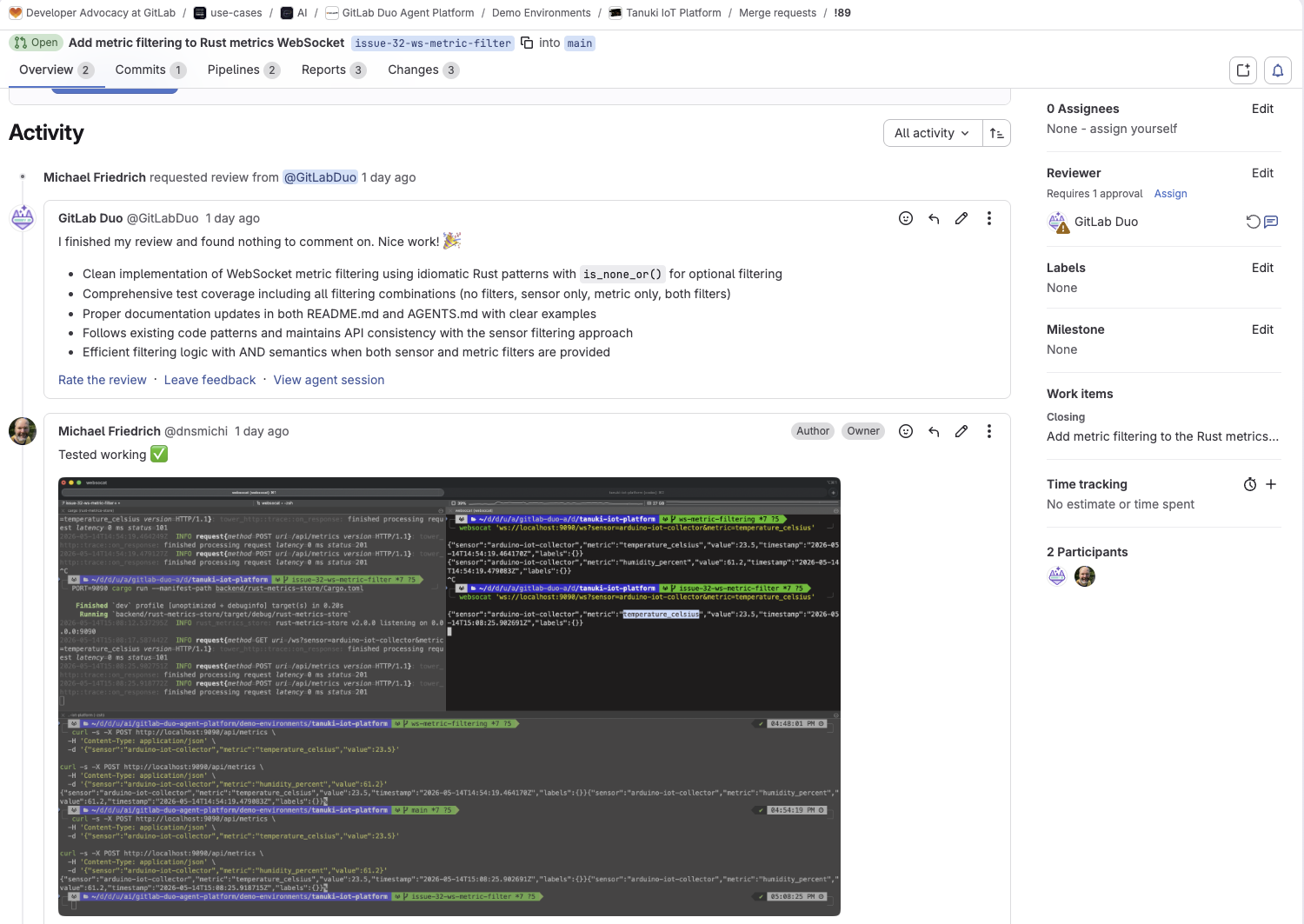
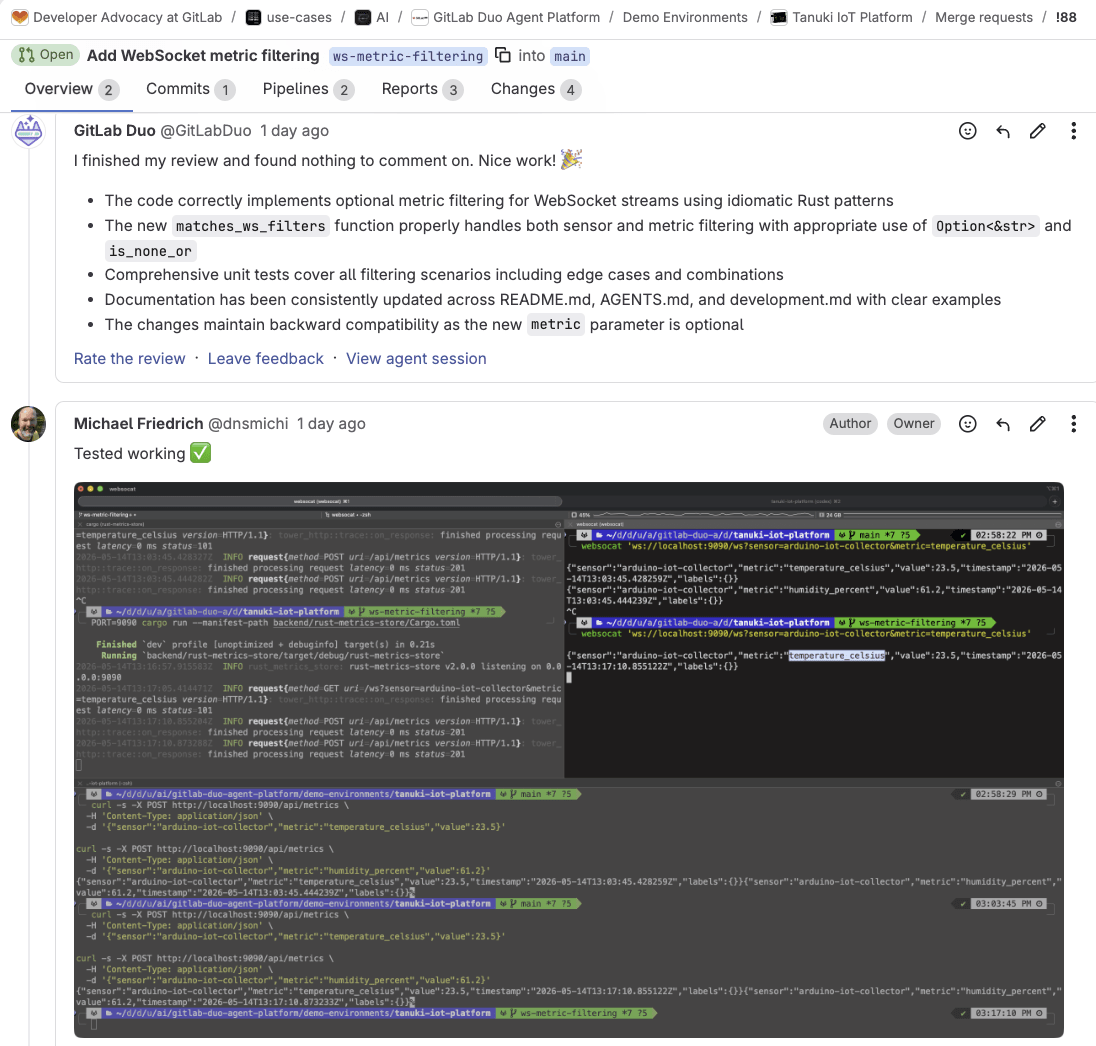
After the deployment, we rerun the local test and confirm that the WebSocket stream now emits only the requested metric when both sensor and metric are provided, and post the results into the merge requests.
 MR comments with GitLab Duo Code Review feedback, and developer sharing the local test results.
This first use case is the baseline: Codex is close to the code and GitLab picks up the work once the patch enters the merge request lifecycle.
Here is a detailed recording of Codex, GitLab CI/CD and GitLab Duo Agent Platform in action:
Fix WebSocket metric filter with GitLab MCP and development lifecycle context
In our first use case, Codex was able to see the project repository. But it did not have visibility to the GitLab issue, the agreed requirements, the implementation notes, or the merge request and pipeline state around the work. That context lives in GitLab, not in the local files.
That is where the GitLab MCP server comes into the picture.
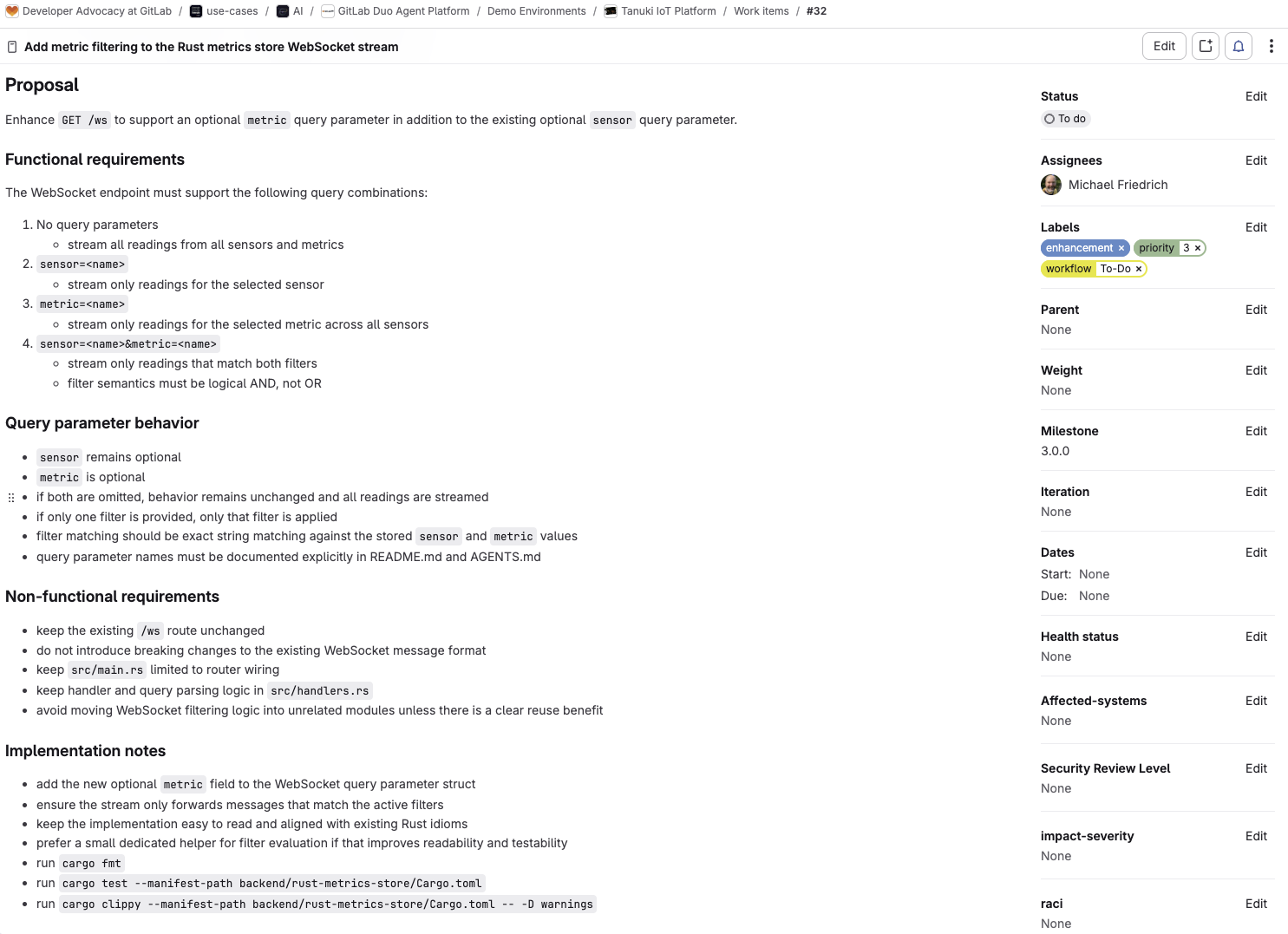
In this use case, the issue already exists and it is detailed on purpose. It describes the problem, includes functional and non-functional requirements, and explicitly calls out tests plus README.md and AGENTS.md updates. That means Codex does not need us to paste all of that into the prompt. It can fetch the issue directly and work from the same source of truth a developer would use.
 GitLab issue with proposal, functional requirements, behavior, non-functional requirements, and implementation notes.
Configure the GitLab MCP server
Next, add the GitLab MCP server to Codex. Ensure it is enabled on the instance or top-level group.
Open a new terminal, and add the GitLab MCP server to Codex using the http transport type.
Modify gitlab.example.com to your GitLab instance:
codex mcp add --url "https://<gitlab.example.com>/api/v4/mcp" GitLab
The Codex MCP client may require a feature flag for the Rust rmcp_client. Open ~/.codex/config.toml and add the [features] section. You can also verify the GitLab MCP server being added in the mcp_servers. section.
vim ~/.codex/config.toml
      [features]
"rmcp_client" = true

[mcp_servers.GitLab]
url = "https://<gitlab.example.com>/api/v4/mcp"
Run codex in a new terminal, and type /mcp to authenticate with the GitLab MCP server if this did not happen automatically when added before.
      codex

/mcp
To verify the connection, ask Codex:
      Which GitLab MCP tools are available to you?

Show the GitLab MCP Server version.
Ask Codex to implement the WebSocket filter issue
Open Codex and ask in the prompt to help with the issue:
Can you help me implement issue 32?
This is where the workflow changes. In this scenario, Codex uses the MCP get_issue tool and pulls the issue details into the session before changing the code. It now sees the requirements, labels, notes, and broader scope of work before it touches the implementation.
 Codex calling the GitLab MCP server tool `get_issue` and showing the issue details in the terminal.
The fix itself looks familiar: Add the optional metric parameter, update the matching logic, add tests and update the docs. The difference is the source of truth. In the first use case, that source of truth was the repository plus the prompt. In this use case, it is the issue and the repository together.
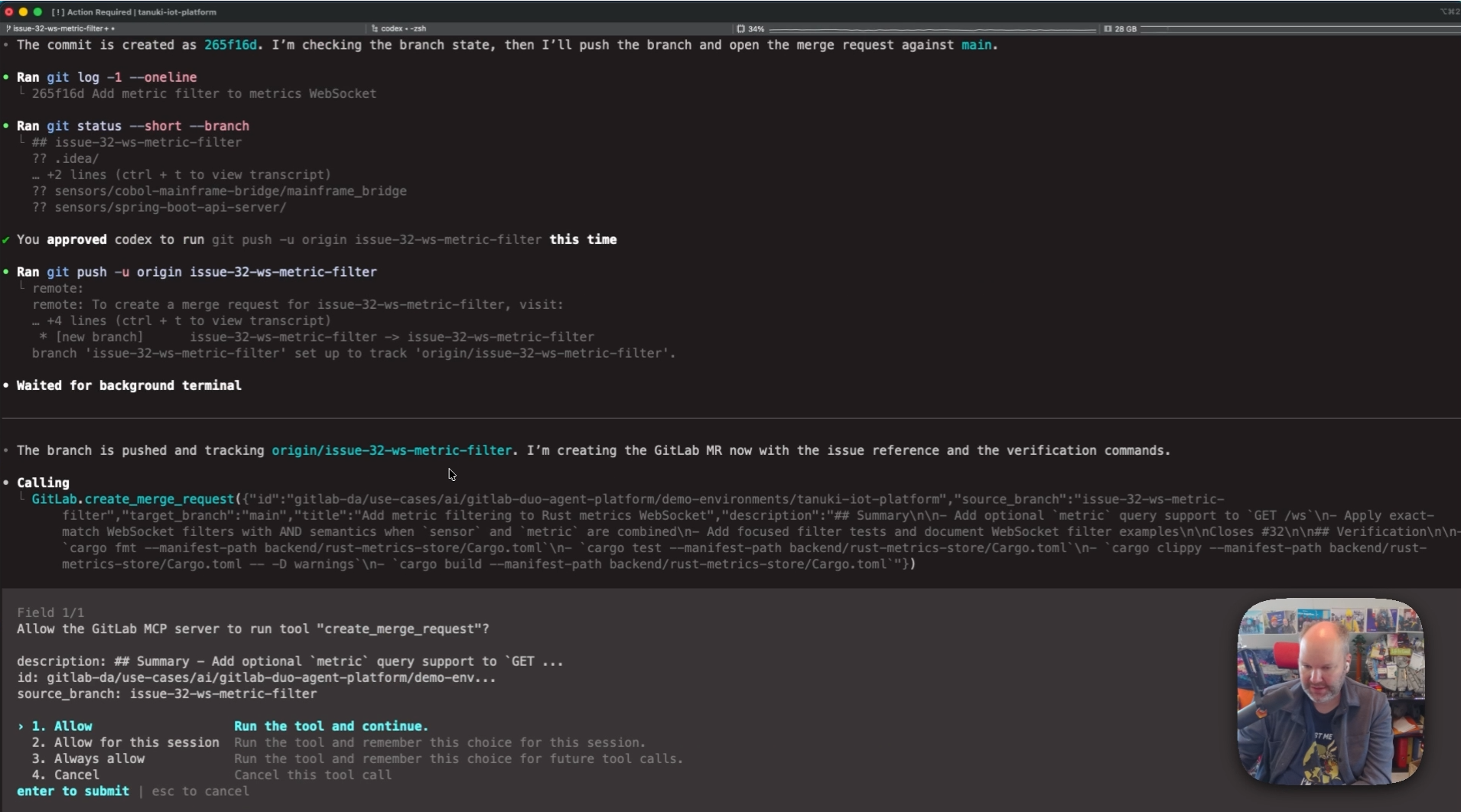
After local validation, Codex creates a branch, commits the work, and creates the merge request through MCP tool calls instead of relying on Git push options or a browser handoff.
 Codex creates a merge request using the GitLab MCP server tool `create_merge_request`.
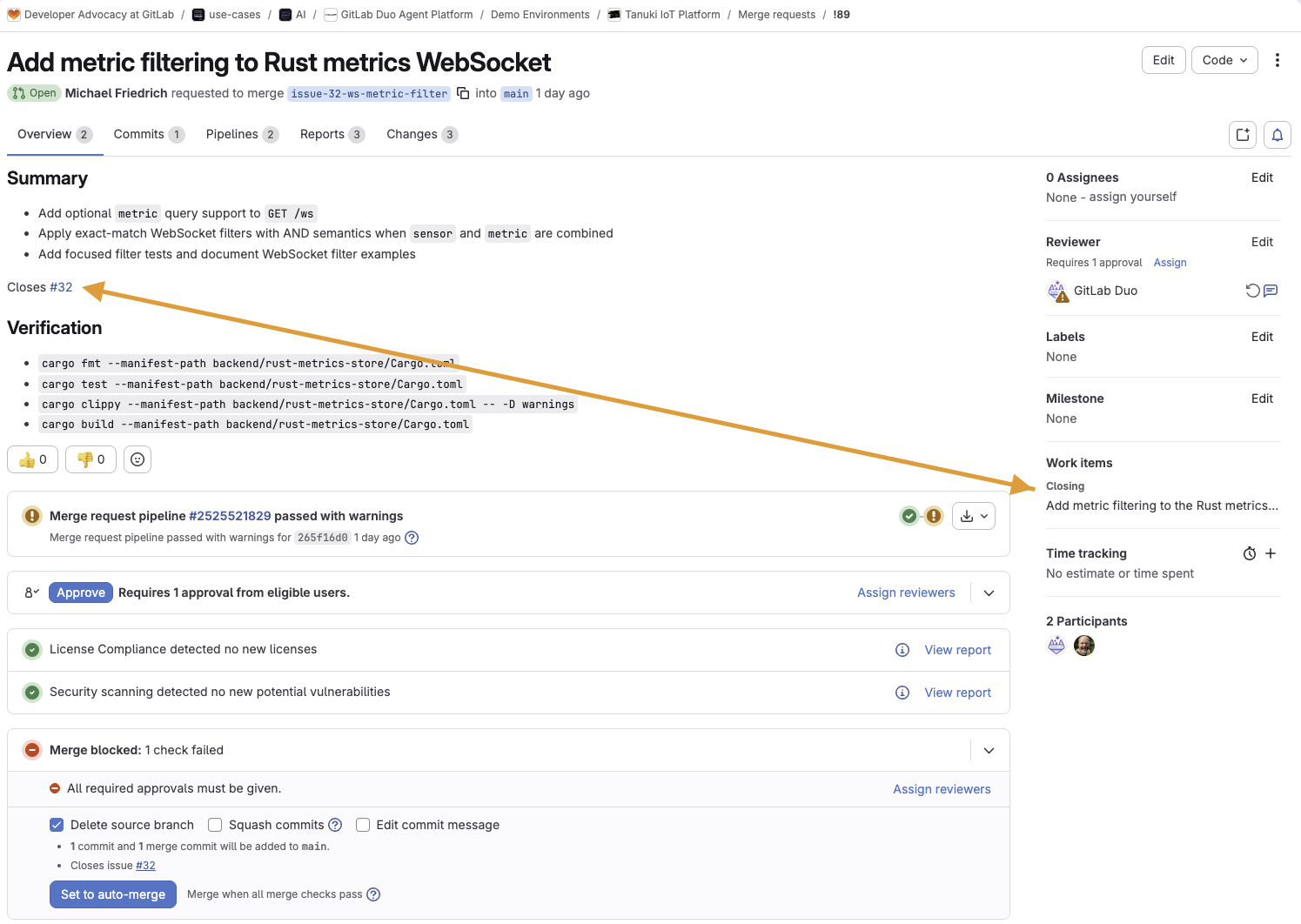
Because it knows the issue context, Codex also adds closes 32 to the merge request description so the issue will close automatically on merge.
 Codex added `Closes #32` into the description, highlighting that it will be closed once merged.
This workflow is more meaningful than it sounds: The agent is no longer just writing code; it is also participating in the software delivery with the issue, merge request, and pipeline context in the loop. That is the value GitLab MCP adds to the end-to-end development workflow..
At this point, once GitLab Duo Code Review and tests give the green light, we are ready for final review and merge.
 Merge request comments with GitLab Duo Code Review and local tests screenshot.
Watch the recording to learn how Codex fixes the problem with the help from the GitLab MCP server:
Verify review feedback and requirements with Codex as external agent
The third use case is where things get even more interesting. Instead of asking whether Codex can open a merge request, we can ask a more practical question: Can it help after the merge request is created, and work through review feedback inside the merge request itself?
For exploring this use case, we switch to a different REST API validation bug. The problem we are simulating with this bug is as follows: POST /api/metrics accepts invalid input and still returns 201 Created as a response message, while it should have returned 400 Bad Request for invalid payload values such as blank metrics.
Let’s test by opening two terminals. In Terminal 1, we will run the metrics store server on Port 9090:
PORT=9090 cargo run --manifest-path backend/rust-metrics-store/Cargo.toml
In Terminal 2, let’s use curl to send a specifically crafted REST API request with an empty metric value to cause an error.
      curl -w "\nHTTP %{http_code}\n" -X POST http://localhost:9090/api/metrics \
  -H "Content-Type: application/json" \
  -d '{"sensor": "sensor-a", "metric": "  ", "value": 23.5, "labels": {}}'
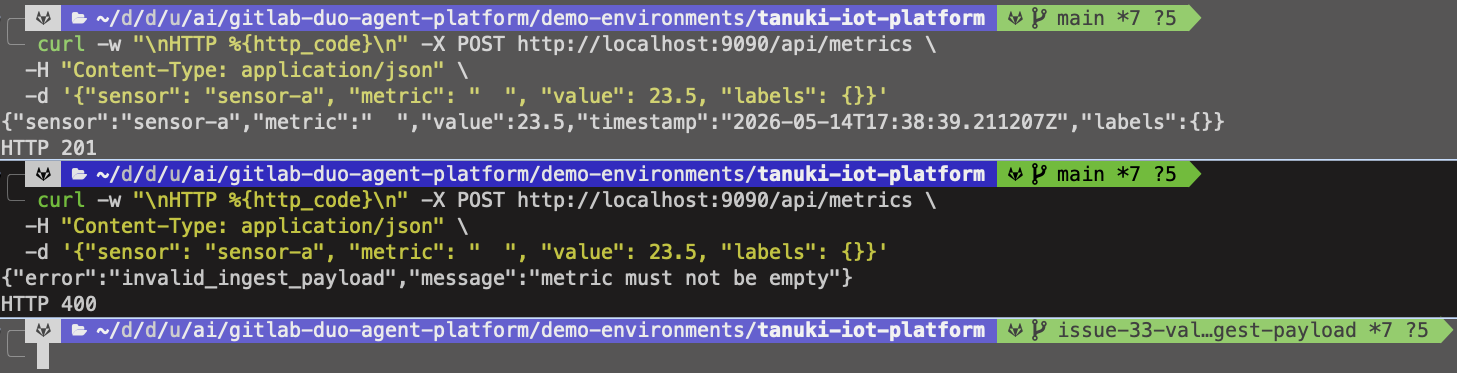
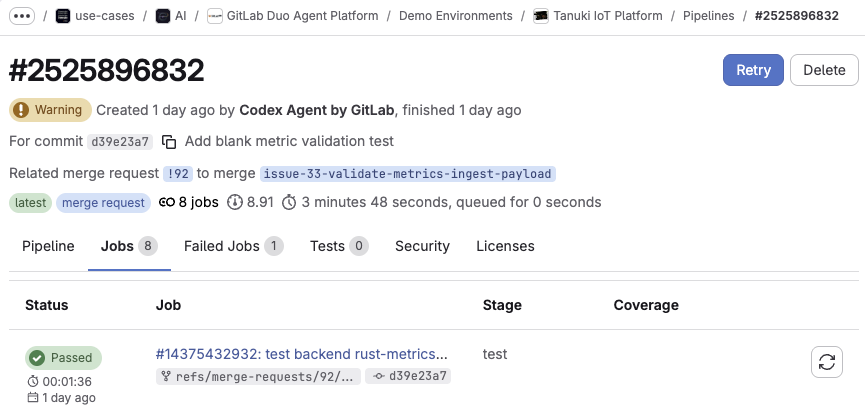
Codex has already opened a first draft merge request with the main fix in place. A quick local retest shows the core behavior has improved and invalid input now returns 400.
 Two curl calls - one with the bug behavior, the other with the fix running.
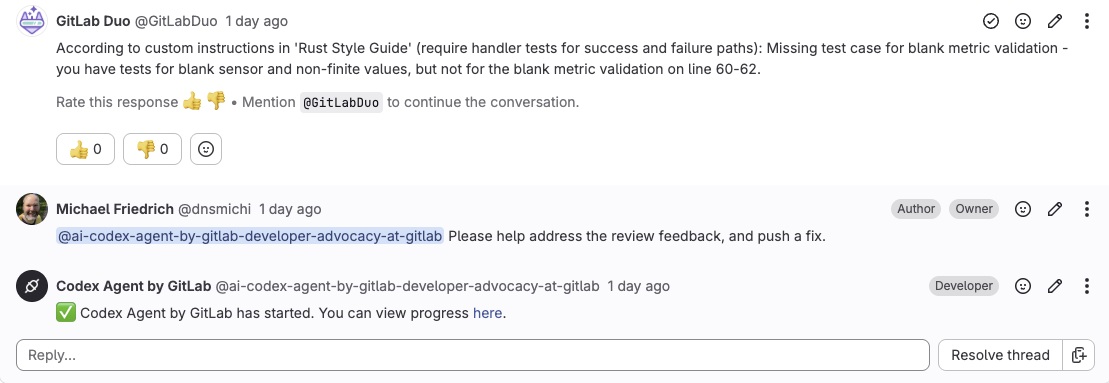
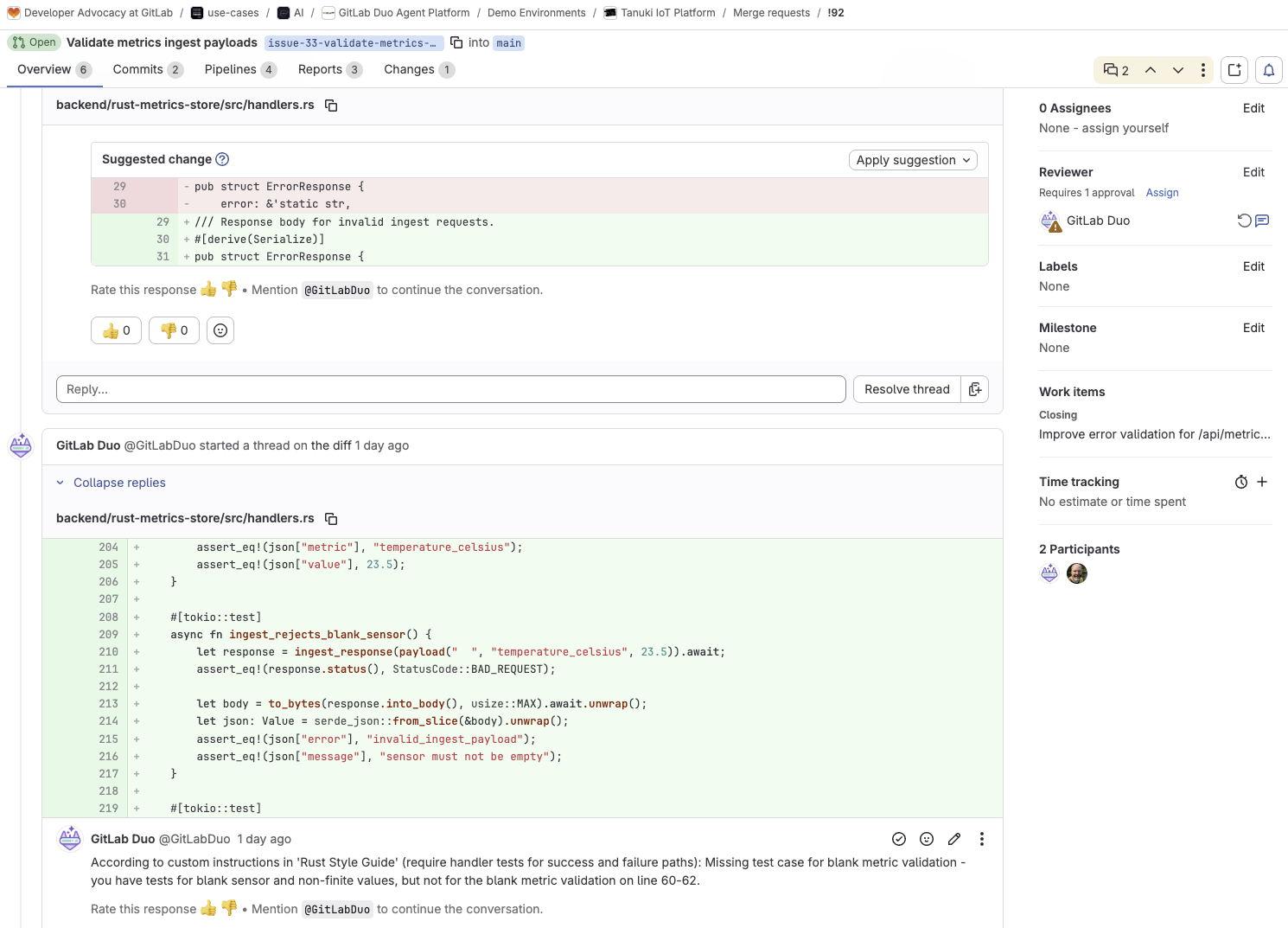
Good, but not done. GitLab Duo Code Review points out two missing pieces based on the Rust code style requirements:
- Public items need documentation comments.
- API changes need handler tests for success and failure paths, and one validation test is still missing.
 GitLab Duo Code Review feedback on the Rust code changes.
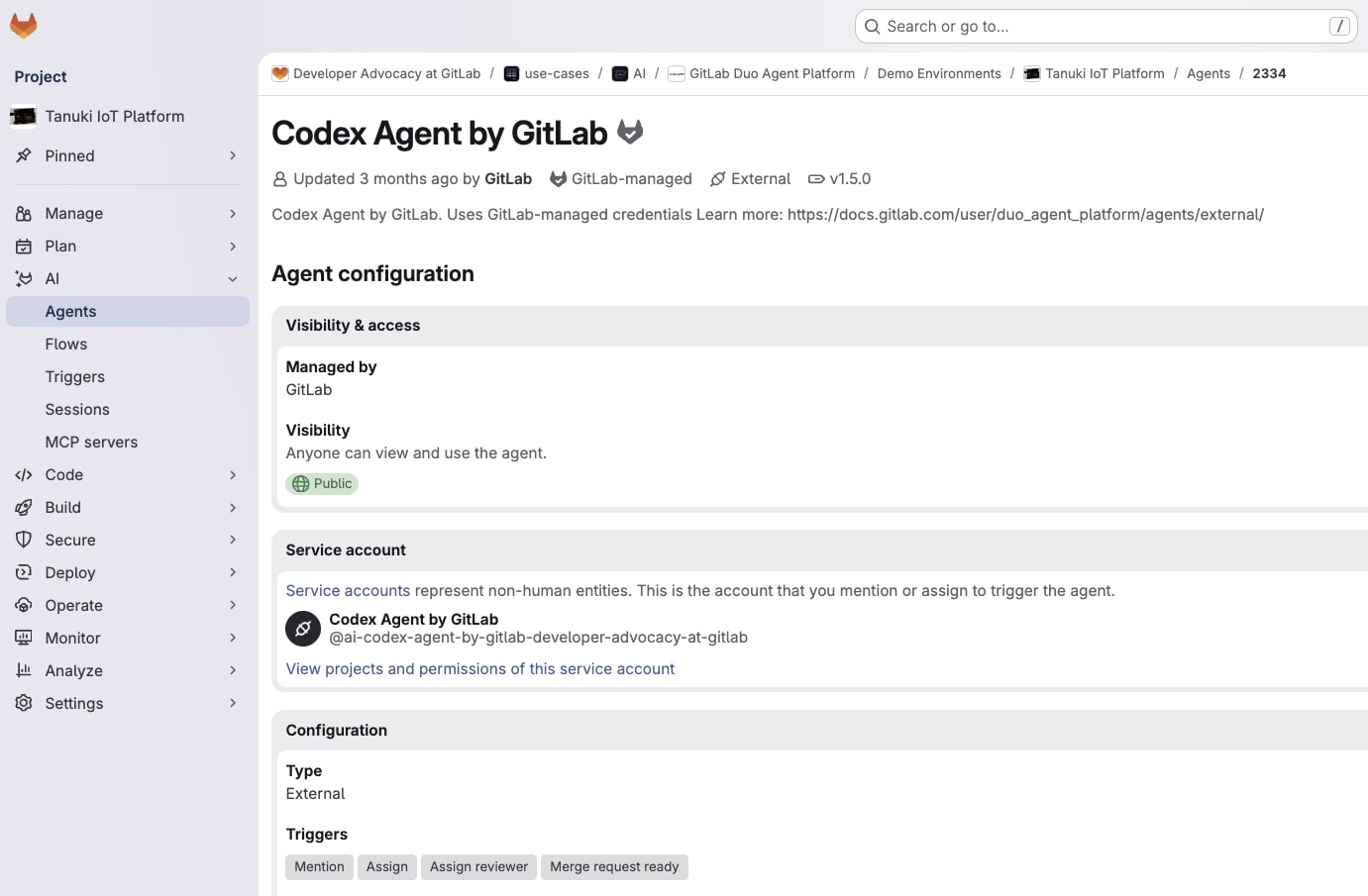
At this point, we move from the local terminal into the GitLab UI where we can enable the Codex agent from the GitLab AI Catalog in the AI > Agents menu. Note the service account handle starting with @ai-codex-agent, and mention the agent directly in the merge request discussion so it can address the review feedback.
 Codex Agent by GitLab enabled in the project.
Now the merge request becomes the working surface for the Codex agent with code diff, review comments, CI/CD pipelines, security scanner results, and approval rules. Codex can work on the follow-up exactly where the collaboration is already happening.
Let’s add a new comment asking for help, with instructions to add the fixes directly to the merge request:
Please help address the review feedback, and push a fix.
 Mention the Codex Agent in a merge request feedback comment.
*
Mention the Codex Agent in a merge request feedback comment.
*
Codex addresses the feedback, adds and commits the missing validation test, reruns checks in its own execution context in the Agent Session, and posts a summary comment back into the merge request.
 The CI/CD pipelines are automatically triggered by the new Git commit.
 Codex Agent by GitLab triggered a new CI/CD pipeline.
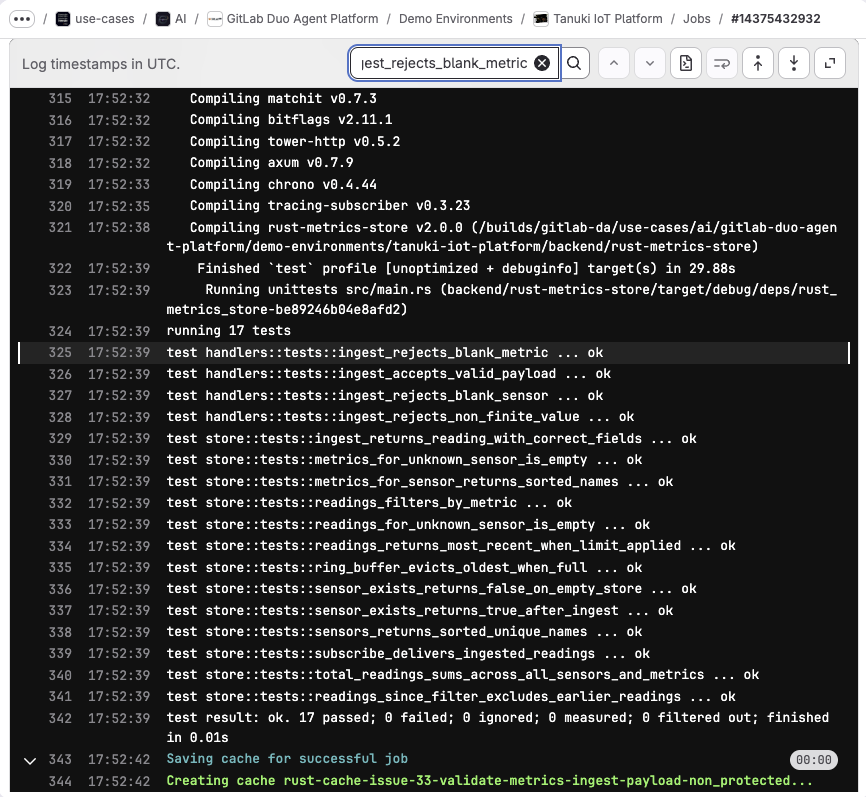
And we can inspect the newly added ingest_rejects_blank_metric test function in the job log.
 CI/CD job log search for `ingest_rejects_blank_metric`.
This is the part that makes the external agent model useful in practice. External agents are not interesting because they replace reviews. They are useful because they help close the gap between review feedback and the next revision, while keeping the merge request, approvals, and final human decision exactly where they belong. And they can be further integrated into GitLab Duo Agent Platform through event triggers and custom flows.
Watch the recording to learn how Codex can help with reviews as an external agent in GitLab Duo Agent Platform.
Tips for Codex and GitLab
Here are tips for using Codex and GitLab together.
Custom instructions with AGENTS.md
You can instruct agents to build and test code before commits, keep changes minimal, or understand the project architecture better, using an entry in AGENTS.md. The Tanuki IoT Platform uses a root-level file, and specific sub-directory files and instructions for sensors and the backend.
      tree -P AGENTS.md --prune
.
├── AGENTS.md
├── backend
│   └── rust-metrics-store
│       └── AGENTS.md
└── sensors
    ├── arduino-iot-collector
    │   └── AGENTS.md
    ├── c-file-monitor
    │   └── AGENTS.md
    ├── cobol-mainframe-bridge
    │   └── AGENTS.md
    └── java-http-metrics-collector
        └── AGENTS.md
For the Rust backend, a directory-level AGENTS.md is maintained in backend/rust-metric-store/AGENTS.md. It defines the code style and standards for Rust, documentation, file organization, error handling, asynchronous programming, containerization and CI/CD, and also how to build and run the code with the available toolchain (Cargo). Open the linked file in the GitLab project to learn all details.
      # rust-metrics-store - Agent Instructions

## Overview

The `rust-metrics-store` is a lightweight, standalone time-series metrics backend for the Tanuki IoT Platform. It accepts metrics from all sensors via a simple REST API and streams live data to frontend clients over WebSocket. No external dependencies — a single binary with in-memory ring buffers.

## Code Style and Standards

### Rust Standards

- Use Rust 2021 edition idioms
- Run `cargo fmt` before committing
- Run `cargo clippy -- -D warnings` and resolve all warnings
- Prefer `Arc<T>` + `RwLock<T>` for shared state; avoid `Mutex` unless write-heavy
- Use `?` for error propagation in fallible functions; only `unwrap()` on truly unrecoverable states (e.g., lock poisoning)
- Derive `Debug`, `Clone`, `Serialize`, `Deserialize` only where needed
- Keep `pub` visibility minimal — expose only what callers need

### Documentation

- Public types and functions must have a doc comment
- Include `# Errors` section in doc comments for fallible functions
- Document env vars and their defaults in `README.md`, not in code

### File Organization

- **`src/main.rs`** — router wiring and `tokio::main`; no business logic
- **`src/store.rs`** — `MetricsStore` and data types; no HTTP concerns
- **`src/handlers.rs`** — Axum extractors and response types; thin layer over the store

### Error Handling

- HTTP handlers should return meaningful status codes (201 for ingest, 404 for unknown sensor)
- Log warnings for recoverable issues (e.g., lagging WebSocket clients) with `tracing::warn!`
- Never silently swallow errors

### Async and Concurrency

- Use `tokio::sync::broadcast` for the live-stream fan-out; `RwLock` for the ring-buffer map
- WebSocket handlers must break cleanly on send errors — do not loop after a closed socket
- Handle `RecvError::Lagged` by logging and continuing, not by disconnecting

### Containerization

- Use a multi-stage Dockerfile: `rust:1.95-slim` builder, `debian:bookworm-slim` runtime
- Always run the container as a non-root user — create `appuser` with `addgroup`/`adduser` and set `USER appuser` before `CMD`
- Include a `.dockerignore` that excludes `target/` and `.git/` to keep build context small
- Use specific image tags — never `latest` in Dockerfile or CI base templates

### CI/CD

- Pin all CI images to specific tags (e.g., `rust:1.95`) — never use `rust:latest` or `debian:latest`
- The `.rust_base` template in `.gitlab-ci.yml` must match the Dockerfile builder image version

## Local Toolchain Setup

// More instructions in the file
These custom instructions are also processed by agents and flows on GitLab Duo Agent Platform.
If you want better output from coding agents, start there. Write down how the repository works, which commands matter, what not to touch, and what a good change looks like. That one investment pays off across local coding tools, GitLab MCP, and external agents alike.
Summary
The three use cases in this tutorial build on each other, but they also make a larger point.
Codex is excellent at helping us move quickly from a problem statement to code. GitLab adds the software delivery context that helps us turn that code into a change we can understand, verify, review, and ship with confidence.
In the first use case, we stayed close to the code and let Codex work from the repository plus local agent instructions. In the second use case, GitLab MCP brought the issue, requirements, and merge request workflow directly into the terminal session. In the third use case, Codex moved into the merge request itself and helped close the gap between review feedback and the next revision.
That progression is what makes the combination compelling. We are not choosing between a coding tool and a DevSecOps platform. We are extending the speed of agentic coding to the entire software lifecycle at scale: across many projects with many release milestones, and across many teams. .
If you are already using Codex, GitLab gives you a practical way to connect that coding speed with the context and collaboration that matter once the patch exists. And if you are already using GitLab Duo Agent Platform, external agents give you a new way to bring third-party coding tools into GitLab without losing the merge request, its audit trail, or the human decision-making that still matters at the end.
If you want to try this yourself, start small. Pick one visible bug, define the expected behavior in an issue, and then move through the same progression we used here: local coding, issue-aware implementation, and merge request collaboration. That is where the combination becomes much more than a fast patch.
If you are not using GitLab Duo Agent Platform today, you can start with a free trial.
If you are already using GitLab in the free tier, you can sign up for GitLab Duo Agent Platform by following a few simple steps.
And if you are an existing subscriber to GitLab Premium or Ultimate, you can get started simply by turning on Duo Agent Platform and start using the GitLab Credits that are included with your subscription.
More to explore
View all blog postsNo related posts just yet — check back soon as more content gets added!
We want to hear from you
Enjoyed reading this blog post or have questions or feedback? Share your thoughts by creating a new topic in the GitLab community forum.
Share your feedback