Published on: May 28, 2026
10 min read
Agentic coding is only as good as its context
Coding agents deliver speed. With lifecycle context in GitLab, enterprises address shallow fixes and longer review cycles.


Every week, another coding agent demo shows a prompt turning into a merge request in under five minutes. These demos often highlight a narrow use case not yet in production, and they skip everything that happens after the commit.
The merge request doesn't include a link to the issue it was supposed to fix. The CI/CD pipeline fails because the agent didn't know about a recently added linter rule. A security scan flags a dependency the agent pulled in without checking the project's approved list.
These are context failures, and they determine whether agentic coding accelerates delivery or creates rework. But when development teams use coding agents with GitLab, the agents draw on the issues, pipelines, and security policies already in the platform, catching problems and remediating them within the developer flow.
This article walks through what changes when you give a coding agent progressively more lifecycle context from repository-only to full platform visibility, using two recent GitLab tutorials as a reference. You'll learn how platform context improves code quality, security assessments, and review cycles, and what platform teams can do today to close the gap.
Putting context into practice
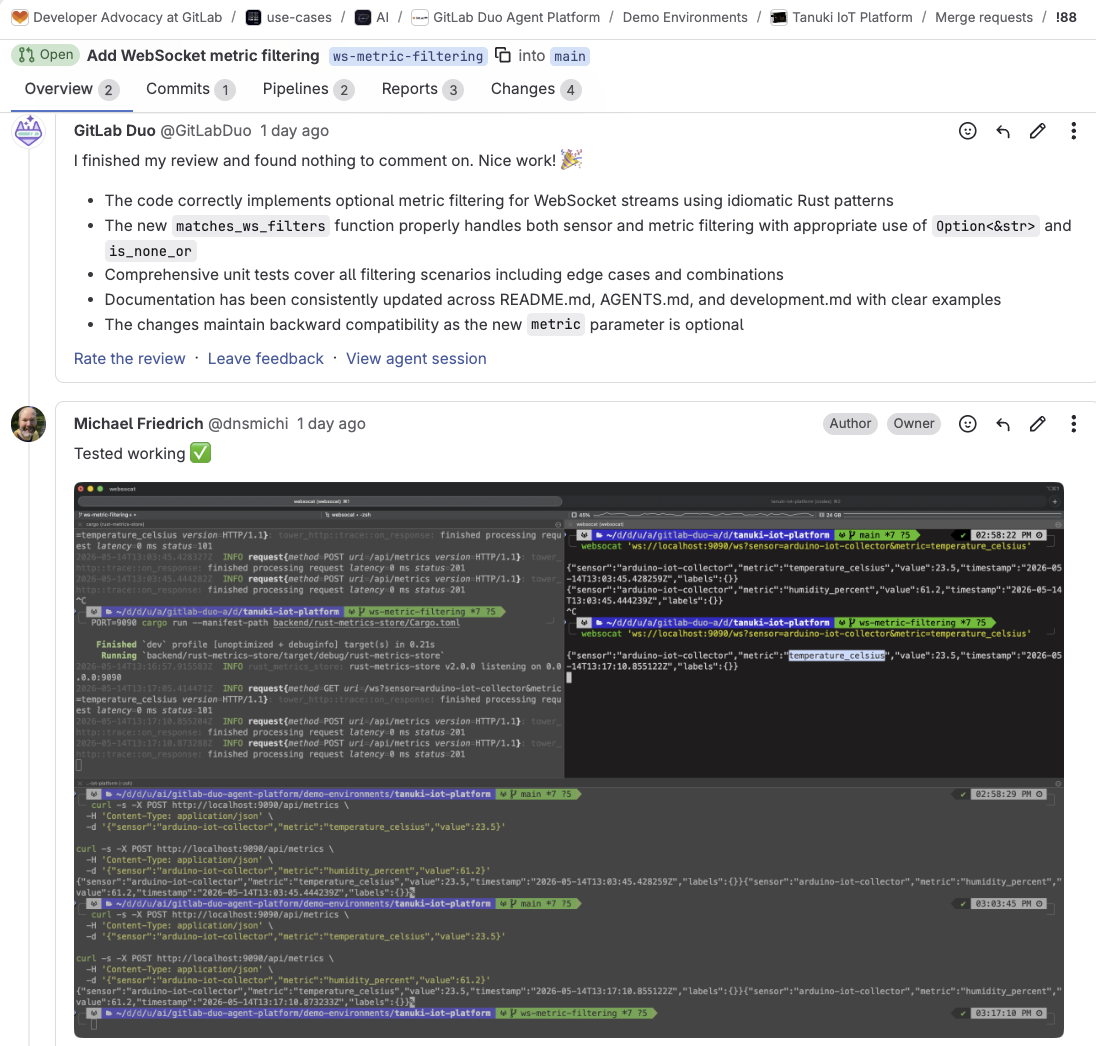
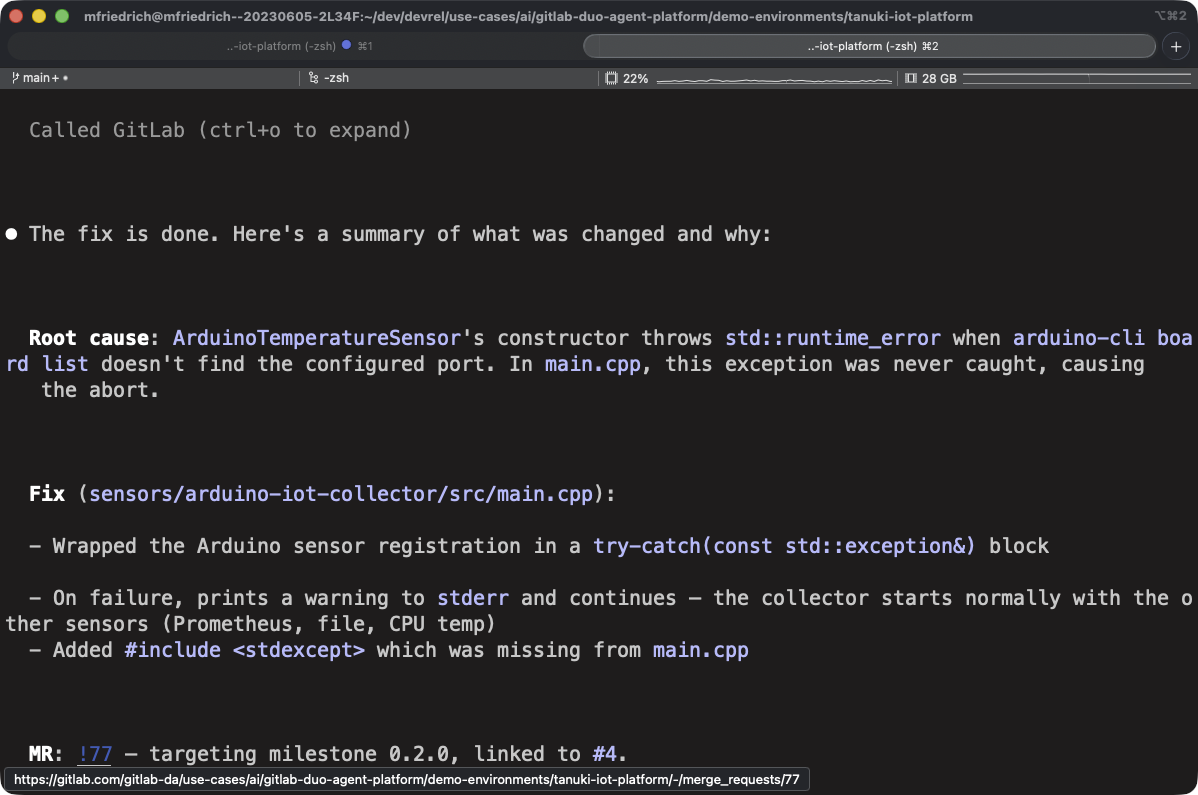
The GitLab tutorials demonstrate what happens when you give an external coding agent progressively more full platform context. The first tutorial illustrates three workflows with Claude Code: fixing a C++ sensor crash, enriching the session with GitLab's Model Context Protocol (MCP) server, and using Claude Code as an external agent inside a merge request to address review feedback. The second tutorial follows the same progression with Codex and GitLab, this time fixing a Rust WebSocket filtering bug across the same three scenarios.
Scenario 1: The agent only sees the repository
You point the agent at the codebase and describe the problem in a prompt. The agent reads files, proposes a fix, and runs the build. The fix works, but it's only based on what the agent infers from local files and your prompt. It doesn't understand your organizational context: the issue's acceptance criteria, the non-functional requirements, or the review standards defined in your project's CI configuration. The code compiles, but it still might not be what your team needs.
Scenario 2: The agent sees the repository and the GitLab issue
Connect the GitLab MCP server, and the agent can fetch the issue before writing any code. Now it reads the functional requirements, implementation notes, labels and milestones. In the Codex and GitLab tutorial, this means the agent adds Closes #32 to the merge request description, because it understands the relationship between the code change and the issue. In the Claude Code tutorial, the agent uses get_issue to pull the bug report, then create_merge_request to file the MR with the right references. This time, the fix aligns to what the team planned.
Scenario 3: The agent works inside the merge request
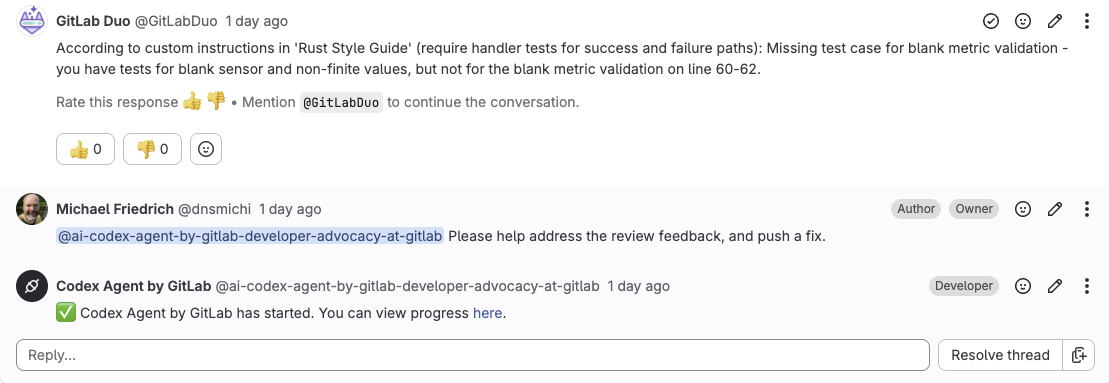
Once the MR exists, GitLab's Code Review Flow runs automatically and posts feedback. In both tutorials, the coding agent gets invoked as an external agent inside the MR to address the review feedback. It adds missing tests, updates documentation comments, and fixes validation gaps the review caught. The agent commits directly to the MR branch, CI/CD pipelines run automatically on the new commit, and a human reviewer can inspect the result without switching tools.
By this scenario, both tutorials demonstrate fewer review rounds and shorter time to merge.

The importance of agentic coding and platform visibility
If you run a platform team, you're deciding how AI-assisted development works across your organization. You're defining which agents are allowed, what tools they can access, how output gets verified, and where human decisions get made in the process.
The agent needs context to produce changes that your organization can trust, and that context lives in your DevSecOps platform. Your issue tracker lists requirements. The CI/CD configuration sets the quality bar. Code review instructions codify the team's style and standards. Security scanners enforce vulnerability policy. And the merge request is where it all comes together — the final human gate.
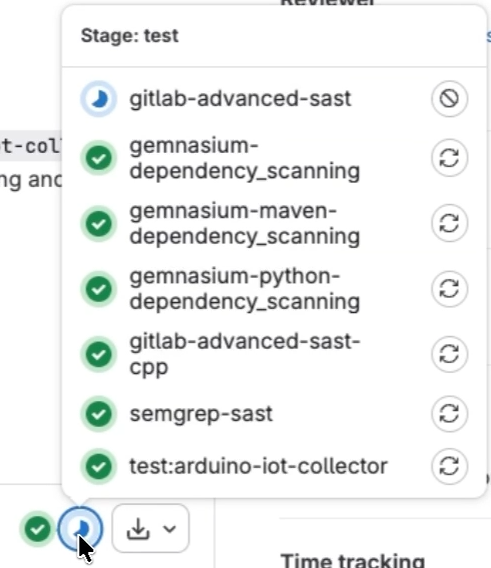
An agent with platform context follows the same workflow that development teams use and within the same guardrails. The diff is in review cycles, pipeline pass rates, and time to merge.
An IDE or terminal-based agent, however capable, sees only the files you give it. The platform has access to the full lifecycle from the issue, pipeline, and security policy, to the deployment target and approval rules. That visibility gap is why your organization's platform, not the agent, determines what ships safely.
The impact on security when agents produce more code
In all tutorials, CI/CD pipelines and code review run automatically on every merge request the coding agent creates. Security scanning is part of the pipelines, even if the tutorials focus on code quality rather than security findings. For platform teams, context becomes even more crucial when security is invoked.
Coding agents produce more code, faster. More code means more vulnerabilities introduced, more findings flagged by scanners, and more fix MRs generated.
- Before AI coding agents entered the workflow, the bottleneck in vulnerability management was on the application security side: scan, prioritize findings, escalate important ones to developers, wait for a fix.
- Now with agents accelerating code production and remediation, the bottleneck shifts. The workflow advances from "which vulnerability should we fix first" to "which AI-generated fix MR should a human review and approve first."
That decision requires context the coding agent doesn't have: the broader project code, the complete data flow, the deployment target, and the security policies that apply across your organization.
- With context, prioritization sharpens: An agent grounded in the surrounding code, data flow, and applicable policies can rank findings by real exposure in your environment rather than generic severity scores, surfacing what matters before reviewers spend cycles on it.
Just as the coding agent in the second scenario produced better code when it could read the GitLab issue, the security layer produces better assessments when it can read the full application context rather than a single file.
GitLab's security layer analyzes findings with full project context, filtering detected false positives and flagging confirmed vulnerabilities. When a vulnerability is confirmed, agentic SAST vulnerability resolution reads the vulnerable code and surrounding context from the repository, and automatically creates a merge request with a proposed fix. The pipeline runs to validate the fix. A human reviewer inspects it and makes the final merge decision. The agent handles remediation; and the governance model stays intact.
CI/CD quality gates, code review instructions, and security scanning all operate in the merge request, which is also where coding agents do their work. The more effective those controls are at the point of code creation, the fewer vulnerabilities reach production.
Custom instructions with AGENTS.md
Both tutorials rely on AGENTS.md files in the repository. These are custom instructions for agents on how the project is structured, which commands to run, and what the code quality expectations are — including what not to touch.
In the Codex and GitLab tutorial, the AGENTS.md file defined everything from the Rust edition to the async concurrency pattern and CI image pinning policy. The agent didn't need context repeated in the prompt. It read the file and followed the rules.
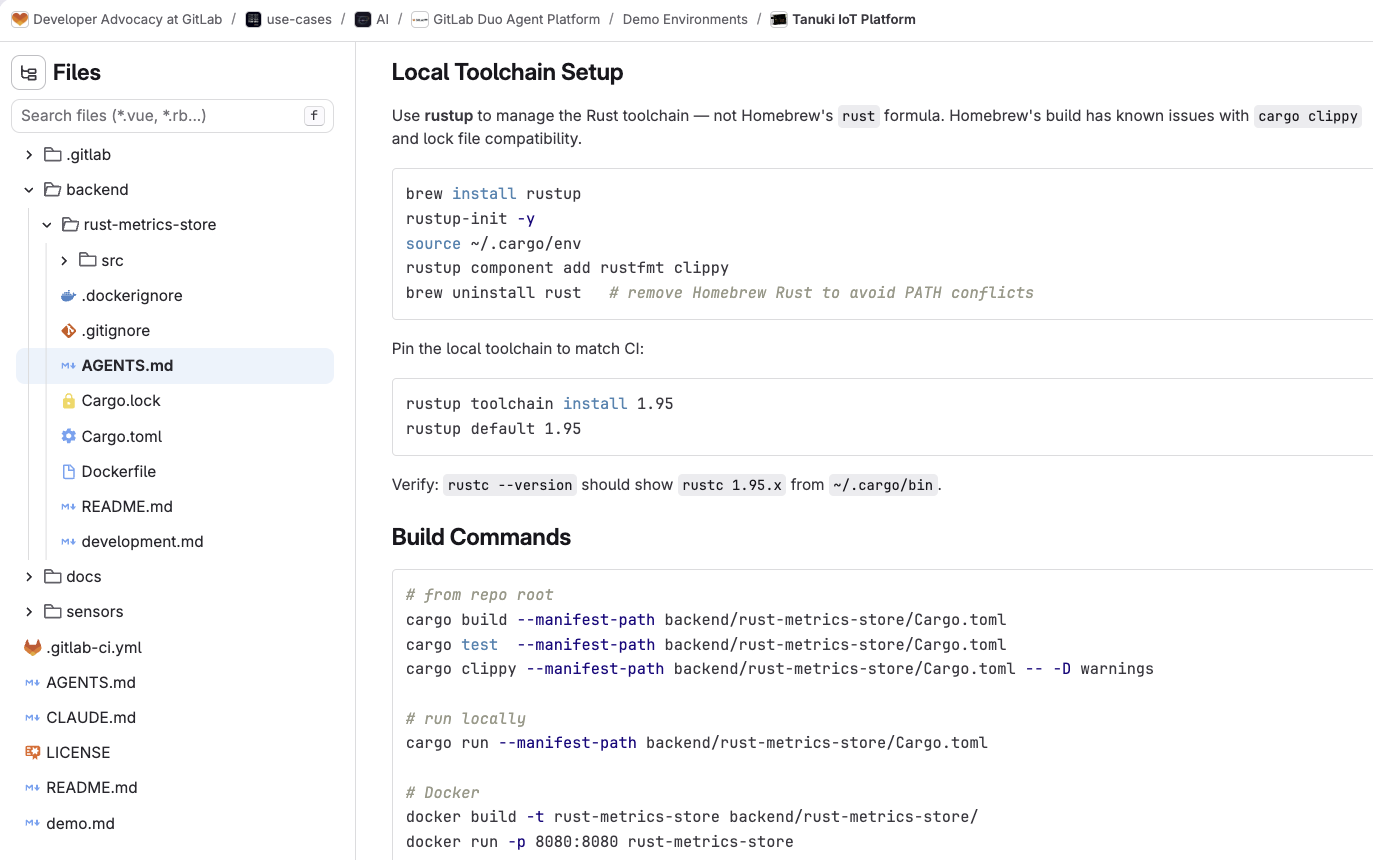
This one-time investment pays off across every agent interaction, whether your agent is running locally in a developer's terminal, connected via MCP, or operating as an external agent inside a merge request. Standardizing AGENTS.md across projects improves agent output quality, because every agent session, local or remote, reads the same rules.
Context window limits
Large language models have finite context windows, and research from teams have shown that model performance degrades as context utilization climbs past 30%–40%. The more tools, files, and instructions packed into a session, the less reliably the agent reasons.
Your organization wants to give the agent rich lifecycle context: issue, review instructions, pipeline history, and security policy. But you also want to ensure the context is structured, relevant, and efficiently delivered.
Instead of having every agent session reconstruct context by reading files and making unnecessary API calls (diluting the context window and consuming tokens), a platform that understands the relationships between code, issues, pipelines, and deployments can provide the right context at the right time. GitLab captures many of these relationships across the lifecycle, positioning it to deliver context more efficiently. When the platform knows which issue a merge request addresses, which services the code change impacts, and which pipelines validate the result, it can deliver that knowledge as structured context rather than reassembling it from fragments.
The efficiency of your organization's AI-assisted development workflows depends on how well your platform delivers structured context, not on the size of your model's context window.
Agents shorten the loop
When a coding agent addresses review feedback inside a merge request, it acts on the review. The agent reads the feedback, makes requested changes, commits them, and lets CI/CD validate the result. The human reviewer still validates the outcome, approving or requesting further changes, making the final merge decision.
Approval rules, code owners, security policies, and audit trails all stay in place. The agent accelerates the revision cycle without bypassing the controls around it.
External agents in GitLab Duo Agent Platform can be further integrated with event triggers and custom flows, giving platform teams control over when and how agents perform in the workflow.
How to get started with agentic coding
If you're evaluating how coding agents fit into your organization's development workflow:
Pick a visible bug in a real project. Define the expected behavior in a GitLab issue with clear requirements. Move through the same progression the tutorials demonstrate: fix it locally with the agent working from the repository, connect GitLab MCP so the agent works from the issue, and use the agent as an external reviewer to address feedback in the merge request.
Invest in AGENTS.md. Document how the repository works, which commands to pay attention to, and what the code quality expectations are. These instructions ensure higher quality agentic output that compounds over time as more agents and developers interact with the project.
Watch context consumption. If agent sessions are slow, expensive, or producing shallow results, the problem is likely the context being fed to the model, not the model itself. Structured, relevant context delivered via platform integrations outperform raw file dumps.
Review security coverage. As coding agents produce more merge requests across projects, check that every project is being scanned. Apply Security Configuration Profiles at the group level so scanners are enabled automatically, then use Security Inventory to confirm coverage and understand where vulnerabilities concentrate.
Get started with agentic coding today
The organizations that get the most from agentic coding will be those with DevSecOps platforms that give agents the right context and controls to ship safely.
If you are not using GitLab Duo Agent Platform today, you can start with a free trial.
If you are already using GitLab in the Free tier, you can sign up for GitLab Duo Agent Platform by following these easy steps.
And if you're an existing GitLab Premium or Ultimate subscriber, get started by turning on Duo Agent Platform and using the GitLab promotional credits included in your subscription.
More to explore
View all blog posts
We want to hear from you
Enjoyed reading this blog post or have questions or feedback? Share your thoughts by creating a new topic in the GitLab community forum.
Share your feedback