Published on: August 6, 2026
6 min read
GitLab Secrets Manager adds ESO, Terraform, API support
Simplify credential management across your stack. GitLab Secrets Manager provides secure retrieval in Kubernetes, Terraform, and external workflows.



Today, you might maintain separate secret stores for CI/CD, Kubernetes, and Terraform. However, that leaves multiple tools to manage, access models to keep in sync, and audit trails to correlate when something goes wrong.
GitLab Secrets Manager now supports External Secrets Operator (ESO) and Terraform, extending secure secret retrieval beyond CI/CD pipelines. Powered by OpenBao, GitLab Secrets Manager provides a single source of truth for secrets across your software delivery chain. You can now use the same secret store for:
- Kubernetes workloads via ESO
- Terraform or OpenTofu Runs
- OpenBao or Vault CLI
- CI/CD Jobs in GitLab (as of Version 19.0)
- Any external automation through the Secrets Manager API
Kubernetes: External Secrets Operator
ESO syncs secrets from GitLab Secrets Manager using the Vault provider. A workload in your cluster holds a short-lived JSON Web Token (JWT) that ESO uses to authenticate with OpenBao and writes the secret into a Kubernetes Secret.
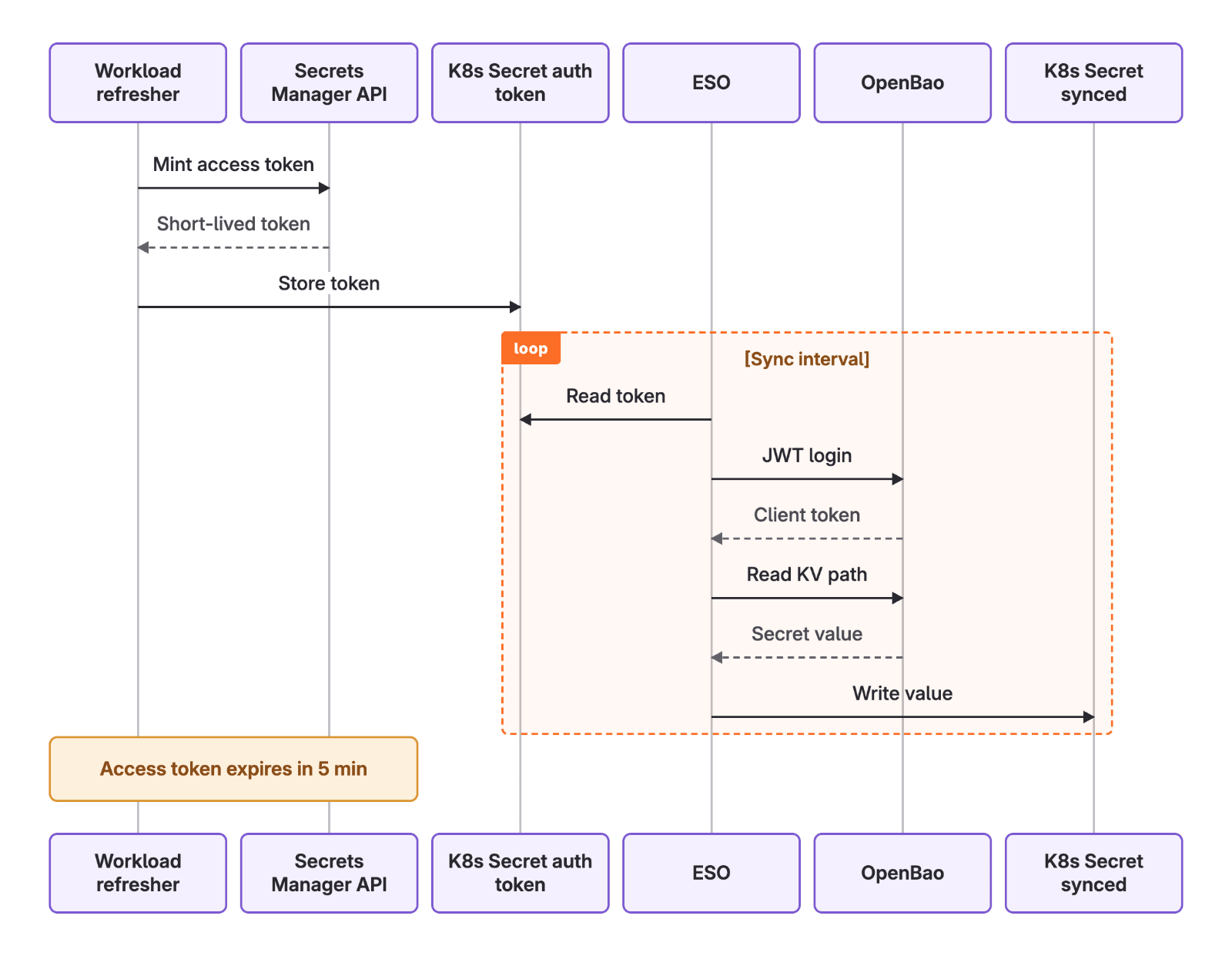
A SecretStore tells ESO where to fetch secrets from and how to authenticate. GitLab Secrets Manager exposes a Vault-compatible KV v2 API and you configure it using the Vault provider. The namespace field maps to your GitLab hierarchy (organization, group, project) and scopes which secrets this store can reach. Authentication uses a GitLab-minted JWT held in a Kubernetes secret, referenced by secretRef.
      apiVersion: external-secrets.io/v1
kind: SecretStore
metadata:
  name: gitlab-secrets-manager
  namespace: my-app
spec:
  provider:
    vault:
      server: https://secrets.gitlab.com      # provider.vault.server
      path: secrets/kv                        # provider.vault.path
      version: v2
      namespace: org_5/group_42/project_99    # provider.vault.namespace
      auth:
        jwt:
          path: api_jwt/cel                   # provider.vault.auth.jwt.path
          role: all_api                       # provider.vault.auth.jwt.role
          secretRef:
            name: gitlab-access-token         # Kubernetes secret holding the minted token
            key: token
An ExternalSecret defines which secrets to pull and where to put them. It references the SecretStore you created above, then maps remote secrets into a Kubernetes secret that your workloads can mount or reference as environment variables.
ESO creates and owns the target secret (synced-secret), re-fetching from GitLab every refreshInterval so rotated values propagate without a redeploy. Each entry under data maps one remote secret to one key in the target: remoteRef.key is the path in GitLab Secrets Manager, property selects a field within that secret, and secretKey is the key it lands under in Kubernetes.
      apiVersion: external-secrets.io/v1
kind: ExternalSecret
metadata:
  name: my-secret
  namespace: my-app
spec:
  refreshInterval: 45m
  secretStoreRef:
    name: gitlab-secrets-manager
    kind: SecretStore
  target:
    name: synced-secret
  data:
    - secretKey: value
      remoteRef:
        key: explicit/<secret_name>           # <secrets_path>/<secret_name>
        property: value
Check out the tutorial with GitLab Secrets Manager and ESO.
Infrastructure as code: Terraform and OpenTofu
Terraform state and .tfvars files are a common source of leaked credentials because secrets end up written to disk or checked into version control by accident. Terraform can avoid that by reading a GitLab secret as a data source, authenticating with a minted JWT at plan or apply time. Reference credentials using Terraform directly where nothing gets stored in .tfvars files or CI/CD variables.
      data "external" "gitlab_secrets_token" {
  program = ["bash", "${path.module}/scripts/mint_token.sh"]

  query = {
    project_id = var.gitlab_project_id
  }
}

provider "vault" {
  address   = data.external.gitlab_secrets_token.result.server
  namespace = data.external.gitlab_secrets_token.result.namespace

  auth_login_jwt {
    mount = data.external.gitlab_secrets_token.result.auth_path
    role  = data.external.gitlab_secrets_token.result.role
    jwt   = data.external.gitlab_secrets_token.result.jwt
  }
}

data "vault_kv_secret_v2" "my_secret" {
  mount = data.external.gitlab_secrets_token.result.mount
  name  = "${data.external.gitlab_secrets_token.result.secrets_path}/<secret_name>"
}

output "secret_value" {
  value     = data.vault_kv_secret_v2.my_secret.data["value"]
  sensitive = true
}
Learn more about how to read secrets in Terraform.
Command line: OpenBao or Vault CLI
Not every workflow goes through the API directly. If your team already scripts against Vault-compatible tooling, the OpenBao or Vault CLI reads secrets from GitLab Secrets Manager the same way it reads from Vault.
      export VAULT_ADDR="<server>"
export VAULT_NAMESPACE="<namespace>"

# Exchange the minted JWT for an OpenBao token, then export it.
vault write "auth/<auth_jwt_path>/login" role=<role> jwt=<token>
export VAULT_TOKEN="<client_token>"

# Read the secret value.
vault kv get -mount=<path> "<secrets_path>/<secret_name>"
When to use the Secrets Manager API
For automation that doesn't fit GitLab CI/CD, Kubernetes, or Terraform, the Secrets Manager API lets any external system fetch secrets from the Secrets Manager, instead of hardcoding credentials or maintaining separate var files.
      # Request JWT token using Service Account
RESPONSE=$(curl --silent --request POST \
  --header "PRIVATE-TOKEN: <your_access_token>" \
  --url "https://gitlab.example.com/api/v4/projects/<project_id>/secrets_manager/access_token")

SERVER=$(echo "$RESPONSE" | jq --raw-output .provider.vault.server)
NAMESPACE=$(echo "$RESPONSE" | jq --raw-output .provider.vault.namespace)
MOUNT=$(echo "$RESPONSE" | jq --raw-output .provider.vault.path)
SECRETS_PATH=$(echo "$RESPONSE" | jq --raw-output .provider.vault.secrets_path)
AUTH_PATH=$(echo "$RESPONSE" | jq --raw-output .provider.vault.auth.jwt.path)
ROLE=$(echo "$RESPONSE" | jq --raw-output .provider.vault.auth.jwt.role)
JWT=$(echo "$RESPONSE" | jq --raw-output .provider.vault.auth.jwt.token)

# Exchange the JWT for a short-lived OpenBao token.
VAULT_TOKEN=$(curl --silent --request POST \
  --header "X-Vault-Namespace: $NAMESPACE" \
  --data "{\"role\":\"$ROLE\",\"jwt\":\"$JWT\"}" \
  "$SERVER/v1/auth/$AUTH_PATH/login" | jq --raw-output .auth.client_token)

# Read the secret value.
curl --silent \
  --header "X-Vault-Token: $VAULT_TOKEN" \
  --header "X-Vault-Namespace: $NAMESPACE" \
  "$SERVER/v1/$MOUNT/data/$SECRETS_PATH/<secret_name>"
Get started
GitLab Secrets Manager is in public beta for Premium and Ultimate customers. Secret access using ESO, Terraform, or the API are currently available on GitLab.com and GitLab Self-Managed, with GitLab Dedicated coming soon.
Secrets Manager is free during the beta period. When generally available, it will be a paid feature billed through GitLab Credits. You'll need to opt in before anything is charged, and we'll give you advance notice.
Read the documentation to get started. If you find a gap or have a request, comment in this issue — we're gathering feedback ahead of general availability.

More to explore
View all blog posts
We want to hear from you
Enjoyed reading this blog post or have questions or feedback? Share your thoughts by creating a new topic in the GitLab community forum.
Share your feedback