Published on: October 15, 2026
5 min read
Get every merge request in front of the right reviewer, faster
GitLab 19.5 recommends the right reviewer for every merge request, so reviews start sooner and route faster, and DevOps teams can ship more changes.

The code is written. Now who reviews it?
The volume of code has never been greater, but delivery hasn’t kept pace. At Meta, code changes on internal platforms grew 220% year over year, while changes that reached users as new features grew only 36% (Reuters, August 2026). Every one of those changes has to clear review before it reaches users.
Automated review absorbs much of that load. Code Review Flow in GitLab Duo Agent Platform reviews merge requests as they arrive, follows custom review instructions you define per project, and costs a flat 0.25 GitLab Credits per review ($0.25 at list price). If a manual review takes about 15 minutes of a senior engineer’s time, that’s roughly $25 per review, so automated review cuts per-review cost by 99% (GitLab).
Automated review doesn’t take people out of the loop. Approval rules, CODEOWNERS, and compliance policies still require a person to sign off on many changes. For those merge requests, the first slowdown is often finding the right reviewer, and it happens before anyone reads a line. The right reviewer needs expertise in the code being changed, room in their queue, and availability in a time zone where they can respond quickly. When authors can’t see those factors, a few senior engineers carry most of the reviews while other qualified reviewers sit idle.
GitLab 19.5 removes that step with Recommend Reviewers Flow. When you create a merge request, GitLab recommends the best individual reviewer based on workload, time zone, availability, and expertise defined by approval rules and CODEOWNERS. The flow explains why it chose that reviewer and lets you assign them in one click. Across your engineering organization, reviews start sooner, review load spreads across every qualified engineer, and more of the code your team writes reaches users.
Watch Recommend Reviewers Flow in action:
Review is a routing problem, not a headcount problem
Teams often treat slow reviews as a people problem. They add reminders, review rotations, extended time zone coverage, and escalations. Those workarounds cost people time and can lead to burnout, and they leave the real cause untouched: routing. The expertise and capacity already exist; there’s just nothing to match them to each merge request as it arrives.
Without that match, the author has to answer questions GitLab already can. Who knows this part of the codebase? Who has room in their queue? Who is online right now? Authors fall back on habits that slow everyone down:
- Assigning a whole group. Everyone gets notified, nobody feels responsible, and the merge request waits for a volunteer.
- Defaulting to the same trusted reviewer. That person becomes a bottleneck, and their own work stalls.
- Guessing across time zones. The reviewer you picked just signed off for the day, so your feedback arrives tomorrow.
Reviewers pay a price, too. Group assignments flood their notifications with merge requests they will never review, which makes the ones that need them easier to miss. And the reviewers everyone defaults to absorb a growing share of the queue on top of their own work, which wears them down faster.
How intelligent reviewer suggestions work
GitLab Duo Agent Platform runs Recommend Reviewers Flow on your merge request and does the research for you:
- You create your merge request. A trigger starts the flow automatically when a merge request is created, whether in draft or ready state, so suggestions arrive from the start.
- The flow evaluates eligible reviewers. It weighs each candidate’s workload, time zone, availability, and expertise as defined by approval rules and CODEOWNERS, to find the person best suited and positioned to respond.
- You see the recommendation and the reasoning. The flow explains why it chose each reviewer, so you can approve the suggestion based on that context.
- You assign with one click. Suggestions appear in a dedicated panel on the merge request. You decide who reviews and when.
This design keeps you in control of timing. You can finish iterating or address automated code review feedback first, then bring in a human reviewer when the change is truly ready. You set it up as a flow trigger in your project rather than a project setting, so it fits alongside the other agentic workflows your team already runs.
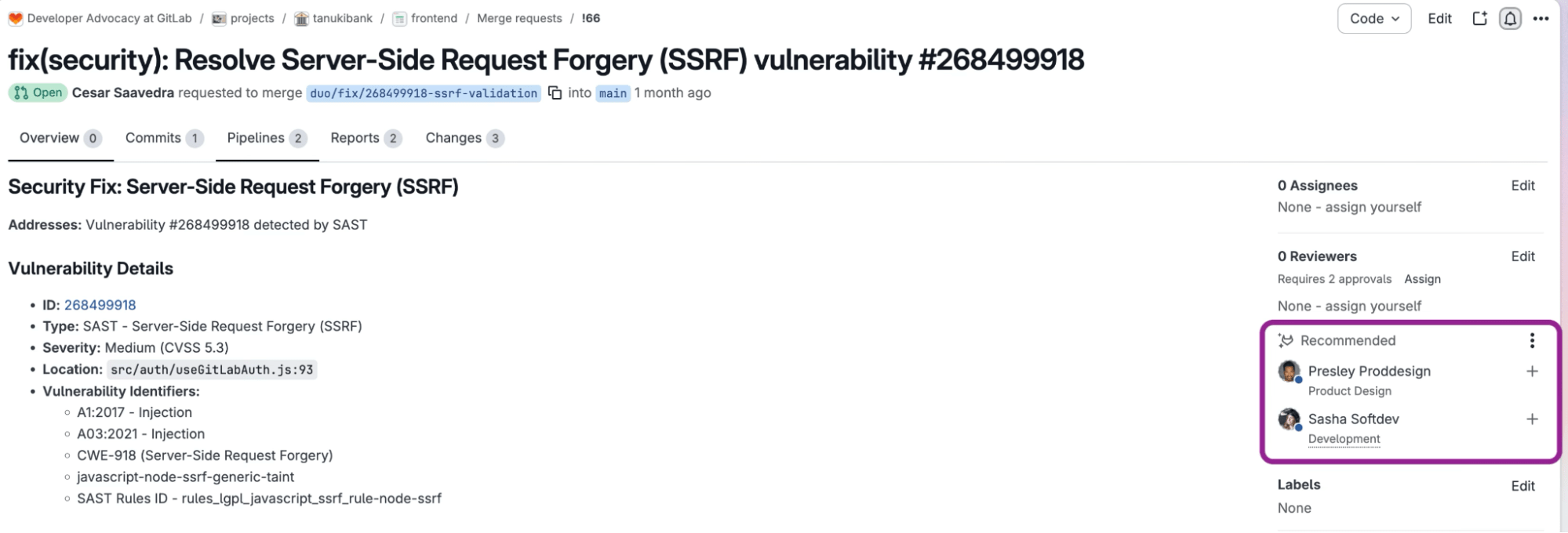 Reviewers ready to be assigned
What your team gains
The right reviewer match means faster feedback, clearer accountability, and a more balanced workload. Recommend Reviewers Flow makes that call consistently, at scale, and with reasoning you can see and override.
Recommend Reviewers Flow also works alongside the other foundational flows in GitLab Duo Agent Platform that handle the work around a merge request:
- Run Code Review Flow first, so automated feedback lands before a person is brought in.
- Add Security Review Flow to check merge request changes for business logic vulnerabilities before they merge.
- Use Fix CI/CD Pipeline Flow to diagnose and repair failed jobs, so a broken pipeline doesn’t hold up an approved change.
- Use Custom Flows to build Recommend Reviewers Flow into the process your team already follows.
Each step from merge request to merge runs on the same platform, under the same policies, so more of the code your team writes actually reaches users.
Get started
Intelligent reviewer suggestions are generally available in GitLab 19.5 for GitLab.com, GitLab Self-Managed, and GitLab Dedicated. To try them, add the Recommend Reviewers Flow trigger to your project, then create your next merge request. Learn more in our documentation.
New to GitLab Duo Agent Platform? Start a free trial today. Already a GitLab Premium or Ultimate subscriber? Turn on Duo Agent Platform and use the GitLab Credits included with your subscription.
More to explore
View all blog posts


We want to hear from you
Enjoyed reading this blog post or have questions or feedback? Share your thoughts by creating a new topic in the GitLab community forum.
Share your feedback